
This blog explains how to build dynamic user interfaces in Laravel without writing heavy JavaScript, using Laravel Livewire. It focuses on practical understanding along with a simple implementation example.
Laravel Livewire
Laravel Livewire is a full-stack framework for Laravel that allows developers to build dynamic interfaces using Blade and PHP, without relying heavily on JavaScript frameworks like Vue or React. It works by handling UI updates through AJAX requests behind the scenes.
Reason to use Laravel Livewire
Livewire improves developer productivity by eliminating the need for complex frontend frameworks. It allows faster development of CRUD operations, better separation of concerns, and real-time UI updates with minimal JavaScript.
Understanding Livewire under the hood
When a Livewire component is loaded, it renders the initial view. Any user interaction such as clicks or input changes triggers a request to the server. The server processes the request and returns updated HTML, which is automatically reflected in the UI.
Installation & Setup
Install Livewire using Composer:
composer require livewire/livewire Include Livewire assets in your Blade layout:
@livewireStyles
@livewireScripts
Livewire Component Structure
A Livewire component consists of two parts: a PHP class and a Blade view. You can generate a component using the Artisan command:
php artisan make:livewire counter or php arisan make:livewire counter --class Practical Implementation: Smart Counter
Component Class
<?php
namespace App\Livewire;
use Livewire\Component;
class Counter extends Component
{
    public $count = 0;
    public $message = '';
    public $isLocked = false;
    public function increment()
    {
        if ($this->isLocked) return;
        $this->count++;
        $this->setMessage('increment');
        $this->checkMilestone('increment');
        $this->lockTemporarily();
    }
    public function decrement()
    {
        if ($this->isLocked) return;
        $this->count--;
        $this->setMessage('decrement');
        $this->checkMilestone('decrement');
        $this->lockTemporarily();
    }
    private function setMessage($type)
    {
        if ($this->count % 2 === 0) {
            $this->message = $type === 'increment'
                ? "Smooth move!"
                : "Balanced again!";
        } else {
            $this->message = $type === 'increment'
                ? "Rising strong!"
                : "Things got spicy!";
        }
}
    private function checkMilestone($type)
    {
        if ($type === 'decrement') {
            $this->dispatch('milestone-hit');
        } else {
            $this->dispatch('play-click');
        }
    }
    public function lockTemporarily()
    {
        $this->isLocked = true;
        $this->dispatch('unlock-after-delay');
    }
    public function render()
    {
        return view('livewire.counter');
    }
}
Blade View
<div x-data="counterUI()" x-init="init()" class="min-h-screen flex items-center justify-center bg-gradient-to-br from-gray-100 to-gray-200">
    <div class="bg-white shadow-xl rounded-2xl p-8 text-center w-80 relative overflow-hidden">
        <h2 class="text-lg font-semibold text-gray-500 mb-2">
            Smart Counter
        </h2>
        <div class="relative h-16 flex items-center justify-center overflow-hidden">
            <span x-text="displayCount" class="text-5xl font-bold text-gray-800"></span>
        </div>
        @if($message)
            <p class="text-sm font-medium mb-4">{{ $message }}</p>
        @endif
        <div class="flex justify-center gap-4">
            <button wire:click="increment" :disabled="locked" class="bg-green-500 text-white px-4 py-2 rounded">+</button>
            <button wire:click="decrement" :disabled="locked" class="bg-red-500 text-white px-4 py-2 rounded">-</button>
        </div>
    </div>
</div>
<script>
function counterUI() {
    return {
        displayCount: @entangle('count'),
        locked: false,
        isEven: true,
        init() {
            this.$watch('displayCount', value => {
                this.isEven = value % 2 === 0;
            });
            this.$wire.on('unlock-after-delay', () => {
                this.locked = true;
                setTimeout(() => {
                    this.locked = false;
                    this.$wire.set('isLocked', false);
                }, 1200);
            });
            this.$wire.on('milestone-hit', () => {
                this.playSound('success');
            });
            this.$wire.on('play-click', () => {
                this.playSound('even-click');
            });
        },
        playSound(type) {
            let audio = new Audio(
                type === 'success'
                ? "{{ asset('/sounds/success-click.wav')}}"
                : "{{ asset('/sounds/even-click.wav')}}"
            );
            audio.play().catch(e => console.log('Audio blocked:', e));
        }
    }
}

</script>
Route Setup
<?php
use App\Livewire\Counter;
Route::get('/counter', Counter::class);
Sound Setup
Ensure your sound files are placed in:
public/sounds/
– even-click.wav
– success-click.wav
This example demonstrates how Livewire updates the UI automatically without writing JavaScript, using simple directives like wire:click and state binding.
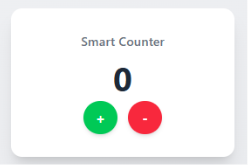
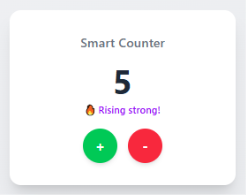
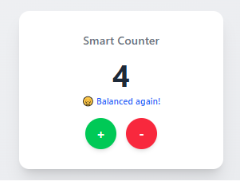
Results of User Interation
Normal State:
When counter is 0.
Increment State:
When counter is in incremented state.
Decrement State:
When counter is in decrement state
Note: In order to enjoy sound on click of every button please use headphones.
Real-world Use Cases
Livewire can be used for features like live search, form validation, pagination without reload, and admin dashboards.
Common Mistakes
Common mistakes include forgetting to include Livewire scripts, overusing Livewire for complex frontend applications, and not optimizing database queries within components.
You may also like : Laravel 13 Features & Updates