
Many small defense contractors say: “Our IT provider handles CMMC.”
That sentence does not hold up. CMMC (Cybersecurity Maturity Model Certification) is the Department of Defense program that checks whether contractors protect sensitive government information. Your company makes the claims, signs the self-assessment and answers for them.
Your provider can do a lot of the work. But you must be able to show which tasks they do, which tasks you do, and what proof exists for each.
This post explains how to write that down in a responsibility matrix. It also covers what your MSP should give you and which mistakes to avoid.
What is a CMMC external service provider?
A CMMC external service provider (ESP) is an outside company you use to run or manage IT or cybersecurity services. A managed service provider (MSP) is the most common example.
One test matters. Under the rule, a provider counts as an ESP only if CUI or Security Protection Data is processed, stored or transmitted on the provider’s own systems.
- CUI (Controlled Unclassified Information) is sensitive government information that is not classified but must still be protected.
- Security Protection Data is data about your security setup, such as logs, settings and administrator passwords.
Most MSPs that run your security tools handle this kind of data, so most are ESPs. A provider that touches neither CUI nor Security Protection Data is not an ESP under the rule.
Two related cases are worth knowing:
- Short-term helpers. A company that only gets temporary access, such as for a security test, is generally not treated as an ESP.
- Cloud providers. They have their own definition. A cloud provider that handles your CUI must meet FedRAMP Moderate (a government cloud security standard) or an equivalent.
Why “our MSP handles it” does not hold up
CMMC Level 2 is built on 110 security requirements from NIST SP 800-171 Rev 2. NIST is the US standards agency that wrote them. As of October 2026, Rev 2 is still the version CMMC uses.
For each requirement, someone has to show who does the work and how you know. “Our MSP does it” is a claim, not proof. It also does not tell a reviewer what you do yourself.
There is a personal side too. Under the rule, a senior person at your company must affirm each year that you are meeting the requirements. That person needs to know what is really being done, and by whom.
Work falls into three groups.
Client tasks (only you can do these):
- Decide who should have access to CUI
- Approve and sign your System Security Plan (SSP), the written document that explains how you meet each requirement
- Train your employees
- Control physical access to your office
- Decide which data counts as CUI
MSP tasks (your provider usually does these):
- Install security updates
- Protect backups
- Manage firewalls and security tools
- Collect and review system logs
Shared tasks (both sides must act):
- Removing access when someone leaves
- Responding to a security incident
- Approving new software or vendors
- Managing multi-factor authentication (an extra login step, like a code on a phone)
Shared tasks cause the most trouble. If neither side owns the hand-off, the task falls through the gap.
What a reviewer will ask about your provider
The reviewer may be your own team doing a self-assessment, a DoD reviewer, or a third-party assessor if that path returns. The questions are similar.
- Which of your systems does the provider manage or access?
- Which requirements does the provider handle for you?
- Where is that written down?
- Can the provider show proof, such as tickets, reports or logs?
- How does the provider keep your data separate from other clients’ data?
- What happens when you or the provider find a security problem?
If your answers differ from your provider’s answers, that is a problem. Both sides need to tell the same story.
What is a shared responsibility matrix?
A shared responsibility matrix is a table. It lists each security area and shows who is responsible: you, your MSP, or both. It also lists the proof that the work is done.
You will also see it called a customer responsibility matrix (CRM). The rule itself uses “customer responsibility matrix.” DoD’s scoping guide and many vendors use “shared responsibility matrix.” They mean the same document.
The rule requires this paperwork. Your use of an ESP must be written into your SSP. It must also be described in the ESP’s service description and its customer responsibility matrix.
A good matrix does three things:
- Removes guesswork about who does what
- Gives a reviewer a clear map
- Shows you gaps before someone else finds them
It is just as useful for a self-assessment as for an outside review. You cannot honestly score yourself on a task if you do not know who performs it.
Sample CMMC shared responsibility matrix
This is a simplified example. A real matrix should cover all 110 requirements and match your own setup.
| Security area | Client | MSP | Shared | Example proof |
| System Security Plan (SSP) | ✔ | Current, dated, signed SSP | ||
| User access (add and remove) | ✔ | Tickets with approval and completion dates | ||
| Multi-factor authentication | ✔ | Settings screenshot; list of enrolled users | ||
| Software updates (patching) | ✔ | Monthly patch reports | ||
| Protecting backup data | ✔ | Backup encryption settings; access list | ||
| Security logs and review | ✔ | Log review records | ||
| Incident response | ✔ | Incident plan; past incident tickets | ||
| Employee security training | ✔ | Training attendance records | ||
| Physical security | ✔ | Door access logs; visitor sign-in sheets | ||
| Vendor and cloud tool approval | ✔ | Approved vendor list; review notes |
The “Example proof” column does the real work. A task with no proof is a task you cannot show anyone.
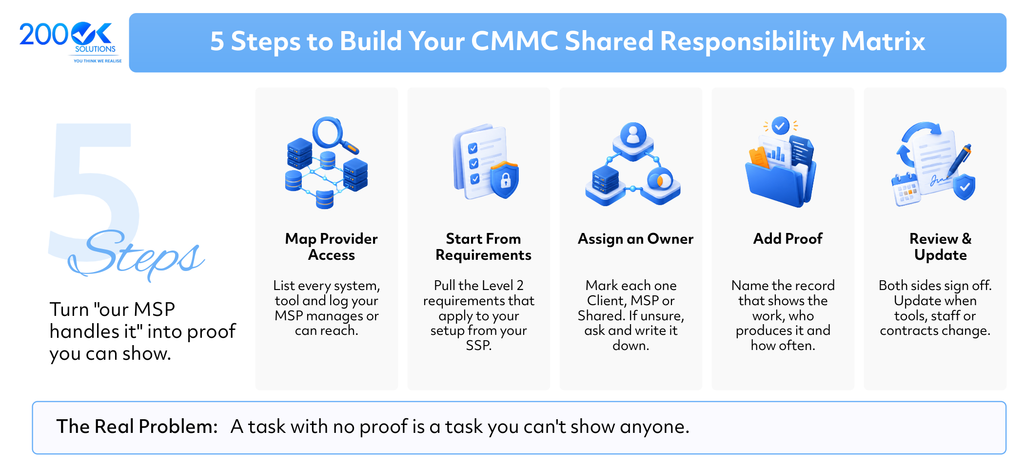
How to build your matrix in five steps
Step 1: List what your provider touches.
Write down every system, tool and service your MSP manages or can reach. Include email, servers, laptops, firewalls and backup tools. Also note where your logs and settings are stored, since that data counts too.
Step 2: Start from your requirements.
List the Level 2 requirements that apply to your setup. Your SSP is the best starting point.
Step 3: Assign an owner to each one.
Mark each as Client, MSP or Shared. If you are unsure, ask your provider and write down the answer.
Step 4: Add proof for each row.
Name the record that shows the work happened, who produces it, and how often.
Step 5: Review, sign and update.
Both sides review the matrix and agree to it. Update it when your tools, staff or contract change.
Worked example: removing access when an employee leaves
This is a shared task. Written clearly, it looks like this:
- Client does: Tells the MSP about the departure by ticket or email. Set your own deadline, such as the same day.
- MSP does: Disables the user’s accounts and removes access to CUI systems. Closes the ticket with the date and time.
- Proof: The ticket showing the request date, the completion date and who did the work.
- Check: Each quarter, the client compares the HR leaver list with the active user list.
Each side has one clear job, and the proof sits in one place.
What your MSP should give you
You should not have to chase these. Ask for them and keep copies:
- A written service description
- Their customer responsibility matrix, in writing and signed
- Regular reports on patching, backups, log reviews and access changes
- A description of how they keep your data separate from other clients
- Their incident notification process and timeline
- Any proof they can share about their own security practices
The service description and the matrix are the two items the rule names. Everything else on the list is good practice.
Questions to ask your MSP before you sign
- Which Level 2 requirements will you handle, and which stay with us?
- Will you sign a responsibility matrix?
- How fast will you tell us about a security incident? If you hold CUI, you must report cyber incidents to the DoD within 72 hours, so your provider has to tell you much sooner.
- Are all staff who can reach our systems U.S. persons? This matters if you handle export-controlled data (ITAR or EAR data). “U.S. persons” is a legal term and is not the same as “U.S.-based,” so ask your export-control advisor what applies to you.
- If our CUI is in a cloud tool, does it meet FedRAMP Moderate or an equivalent?
- What proof will you give us each month?
- Will you help us during a review? What does that cost?
- What happens to our data and access if we end the contract?
If a provider cannot answer clearly, treat that as a warning sign.
Five mistakes that cause trouble
- Assuming the MSP covers everything. Your SSP, training, physical security and CUI decisions stay with you.
- Leaving shared tasks vague. “We both handle access” is not an answer. Write who does which step.
- Having no proof. If a task has no record, you cannot show it was done.
- Letting the matrix go stale. New tools, staff and contracts change who does what.
- Giving the MSP too much access. Know which accounts your provider uses and what they can reach.
FAQ
Q. Does my MSP need its own CMMC certification?
A. No. The rule does not require it for most ESPs. The provider’s services are reviewed as part of your assessment. An ESP may choose to get certified to reduce its own effort.
Q. Is a responsibility matrix really required?
A. The rule says your ESP use must be documented in your SSP. It must also be described in the ESP’s service description and customer responsibility matrix.
Q. What if my MSP never touches CUI or Security Protection Data?
A. Then it does not meet the rule’s definition of an ESP. Check this carefully. Many MSPs handle security data without realizing it.
Q. Is there an official template?
A. The rule requires the matrix but does not set a format. Our template follows the structure in this post. You can adjust it to your setup.
You may also like : The MSP AI Revenue Gap: Why Clients Want AI and Only 13% of MSPs Sell It