
Quick answer: what is Microsoft Fabric for MSPs?
Microsoft Fabric for MSPs is one capacity-billed analytics platform that lets a managed service provider (MSP) turn client data into MSP reporting, dashboards and a central data warehouse without stitching together separate tools. A single Microsoft Fabric capacity powers Power BI, pipelines, Spark and warehouses, so an MSP buys compute once and shares it across workloads.
Key facts at a glance:
- Microsoft Fabric pricing follows capacity size, from F2 to F8192. Azure bills per second with no commitment, plus an optional yearly reservation.
- Microsoft Fabric licensing changes at F64. On F64 or larger, viewers need only a free license and a viewer role. Below F64, each viewer needs Power BI Pro or Premium Per User.
- MSPs can buy Fabric capacity through the Microsoft CSP program.
- With no in-house data engineers, a Microsoft Fabric partner such as 200OK Solutions can design and run it with you.
Why does Microsoft Fabric matter for MSPs?
MSP data sits in many places: a PSA (professional services automation) tool, an RMM (remote monitoring and management) platform, billing, documentation and each client’s Microsoft 365 and Azure tenants. Microsoft Fabric lands that data in one place, called OneLake, and gives you one skill set to report on it.
| Fabric workload | What an MSP uses it for |
| Data Factory pipelines | Pull PSA, RMM and billing data on a schedule |
| Data engineering (Spark) | Clean and combine large or messy data sets |
| Data warehouse | Store curated client and service data for SQL reporting |
| Real-Time Intelligence | Watch alerts and events as they arrive |
| Power BI | Deliver dashboards and MSP reporting to clients |
Three business problems are solved first: client reporting that refreshes itself, margin visibility by joining tickets, alerts and billing, and new Microsoft Fabric services you can sell on top of existing contracts. For example, joining PSA ticket hours with billing shows which client contracts quietly lose money.
How do Microsoft Fabric pricing, licensing and capacity work?
Microsoft Fabric pricing is capacity-based. You buy an F SKU, and its number is the Capacity Units (CUs) of compute it provides. Every workload draws from that one Microsoft Fabric capacity. Pricing is regional, and Microsoft recommends F SKUs over the Power BI Premium P SKUs it is retiring.
| SKU | Capacity Units | Power BI equivalent | Typical MSP use (200OK view) |
| F2 | 2 | None | Pilot and internal MSP reporting |
| F8 | 8 | EM/A1 | A few client report sets |
| F32 | 32 | EM3/A3 | Growing client base, below the free-viewer line |
| F64 | 64 | P1/A4 | Many client viewers on free licenses |
| Trial | 64 | None | 60-day proof of concept |
Four licensing rules matter most:
- F64 is the viewer threshold : Microsoft Fabric licensing lets a free-license user with a viewer role see Power BI content only on F64 or larger. Smaller SKUs need Pro or Premium Per User for every viewer.
- Authors always need Pro : Creating Power BI items outside My workspace requires a Pro or Premium Per User license.
- Premium Per User is not a capacity : It cannot run lakehouses or warehouses.
- Reservations save money, not flexibility : A Microsoft Fabric capacity can be paused, but a reservation commitment continues regardless.
Break-even rule: F64 pays off when its extra monthly cost over the smaller SKU you would otherwise buy, divided by the Pro price per viewer, is less than your viewer count. Use current Azure rates for the inputs.
A Fabric capacity lives in one Microsoft Entra tenant, and each workspace is tied to a region and billed separately. Decide early whether client data sits in your tenant or theirs.
Microsoft Fabric vs Power BI and Microsoft Fabric vs Databricks
Microsoft Fabric vs Power BI : Power BI is the reporting layer. Fabric is the platform that includes Power BI plus pipelines, engineering, a data warehouse and OneLake. For dashboards alone, Power BI licenses are simpler: Microsoft says Premium Per User is more cost-effective than a capacity for fewer than 250 users needing Premium features. Move to Fabric when you must ingest, transform and store data from many sources.
Microsoft Fabric vs Databricks: both support lakehouse designs on open formats. Fabric is software-as-a-service, integrates tightly with Power BI and Microsoft 365, and takes less effort to run for small teams. Databricks gives deeper control for multi-cloud and machine-learning engineering.
| Question | Microsoft Fabric | Databricks |
| Delivery model | SaaS, one capacity bill | Platform you configure and tune |
| Best fit for MSPs | Microsoft-centric clients, fast reporting | Clients already on Databricks, advanced engineering |
| Reporting | Power BI built in | Connects to Power BI or other tools |
| Admin effort | Lower | Higher |
200OK Solutions also partners with Databricks, so the choice follows the client’s needs, not a vendor preference.
How can MSPs package Fabric as a service?
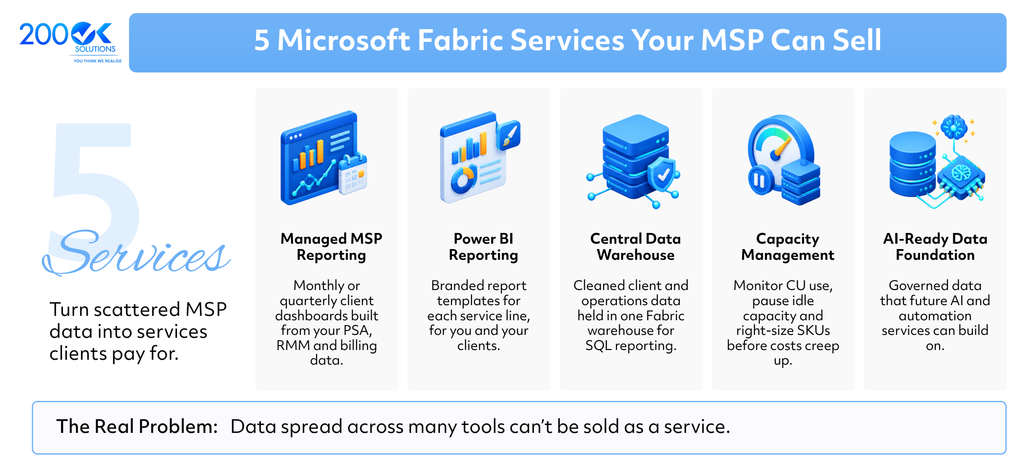
Microsoft Fabric OneLake underpins all five. Every Fabric tenant gets one OneLake, which stores tables in open Delta Parquet format so SQL, Spark and Power BI all use one copy of the data. OneLake security roles can also limit access down to specific rows and columns, which helps when one table serves several clients. Design that carefully.
How does the Microsoft CSP route work for Fabric?
Microsoft CSP (Cloud Solution Provider) lets MSPs resell Microsoft cloud products and bill clients under their own contract. Microsoft Learn confirms you can buy Fabric capacity through a CSP. Fabric capacity is an Azure purchase, so your Azure plan and each client’s subscription structure matter. Check eligibility and margin with your distributor before you quote.
Clients searching for a Microsoft Fabric partner want proof of delivery more than a badge: reference architectures, staff with Microsoft Fabric certification such as the Fabric Data Engineer Associate, and a clear support model. Show who builds, who monitors and who answers when a report refresh fails.
What does a Microsoft Fabric implementation look like?
A practical Microsoft Fabric implementation for an MSP follows six steps:
- Discover : List data sources and the reports each client expects.
- Size the capacity : Start on a trial or small pay-as-you-go SKU and measure real usage.
- Ingest into OneLake : Build pipelines that land data on a schedule.
- Model the data : Use a lakehouse or warehouse with consistent client and service keys.
- Build reports : Create Power BI reports and test with one friendly client first.
- Operate : Monitor capacity, govern access and review cost monthly.
Avoid four common mistakes: buying F64 on day one, reserving before measuring, mixing client data without a row-level access design, and forgetting that report authors need Pro.
Microsoft Fabric consulting makes sense when you have no data engineer, a deadline for first client dashboards, or a need to model F-SKU cost before committing. It also covers Microsoft Fabric migration from older Power BI Premium capacities or legacy reporting databases. 200OK Solutions builds platforms like this through its For MSPs partnership programme.
FAQ: Microsoft Fabric for MSPs
Q. What is Microsoft Fabric for MSPs?
A. Microsoft’s unified analytics platform used by managed service providers to automate MSP reporting, centralise client data and sell data services on one billed capacity.
Q. What does Microsoft Fabric pricing look like for an MSP?
A. It depends on SKU size (F2 to F8192), pay-as-you-go versus reservation, and viewer count. Azure bills per second, and rates vary by region.
Q. Does Microsoft Fabric licensing require Power BI Pro for clients?
A. Creators always need Pro or Premium Per User. Viewers need Pro or Premium Per User below F64, and a free license plus viewer role at F64 and above.
Q. Is Fabric better than Databricks for MSPs?
A. For Microsoft-centric MSPs wanting fast reporting and low admin effort, usually yes. Choose Databricks when clients already run it or need advanced engineering.
Q. Can an MSP resell Microsoft Fabric through Microsoft CSP?
A. Yes. Microsoft Learn documents buying Fabric capacity through a CSP.
Next step
Microsoft Fabric turns scattered MSP data into reporting and services clients pay for, if capacity, licensing and design are right from day one. 200OK Solutions is a London-based software engineering partner, working since 2011 on data, cloud and AI platforms. To plan your first Fabric offer, email info@200oksolutions.com or visit the For MSPs page.
You may also like : How MSPs Can Add AI Services Without an AI Team (Build, Buy or Partner)