
Quick answer: AI ticket triage uses language models to read each new support ticket, classify it, set its priority, and route it to the right technician or queue. For MSPs it is the most useful form of service desk automation, because triage happens on every ticket before any work starts. Done well, it shortens first response, keeps SLAs predictable, and stops senior engineers from spending their mornings sorting the inbox.
What is ticket triage?
Ticket triage is the process of reviewing a new ticket and deciding what it is, how urgent it is, and who should handle it. That means three decisions: category, priority, and owner.
An MSP adds a fourth decision: which client contract applies, and therefore which SLA clock is running. A password reset for a client on a premium plan and the same request from a basic-plan client may have different response targets.
In most MSPs, a dispatcher or service manager makes these calls by reading every ticket by hand.
Why manual triage breaks down in an MSP help desk
A single-company IT team triages for one environment. An MSP help desk triages for dozens of them at once. Four problems show up repeatedly:
- Uneven volume : Tickets spike on Monday mornings, after patch windows, and during outages. The dispatcher becomes the bottleneck exactly when speed matters most.
- Vague tickets : “Computer is slow” and “it’s not working” tell a dispatcher almost nothing without checking the client, the device, and the history.
- Client-specific rules : Each client has its own SLA, escalation contacts, and tool stack. No one person remembers them all.
- Misrouting : A ticket sent to the wrong queue gets reassigned, and each reassignment adds delay while the SLA clock keeps running.
Hiring another dispatcher helps for a while. It does not fix the underlying pattern, which is why MSPs look at help desk automation.
What is AI ticket triage, and how does it work?
AI ticket triage replaces keyword matching with language understanding. Instead of looking for the word “printer”, the system reads the whole ticket and works out the issue, the affected system, and how urgent it sounds.
A typical flow has six steps:
- Ingest : The system receives tickets from email, the client portal, chat, and RMM alerts.
- Understand : A language model reads the text and identifies the issue type, the affected system, and urgency signals such as “all users” or “cannot process payroll”.
- Enrich : It pulls the client, contract, asset, and ticket history from your PSA.
- Decide. It proposes a category, priority, owner, and any related or duplicate tickets.
- Act or recommend : It either writes the result into the ticket or suggests it to a dispatcher for approval.
- Learn : Technician corrections feed back so the same mistake becomes less likely.
The “recommend” option in step 5 matters. Most MSPs should start there.
What can service desk automation handle?
Not every task suits AI. This table shows where AI ticket triage adds something beyond rules-based automation.
| Task | Rules-based automation | AI ticket triage |
| Categorise a ticket | Matches fixed keywords; breaks on unusual wording | Reads the full context |
| Set priority | Uses a form field the client filled in | Infers impact from the description |
| Spot duplicates or a major incident | Limited | Groups similar tickets as they arrive |
| Route to a technician | Round-robin | Matches skill, workload, and client |
| Draft a first response | Static template | Context-aware draft for human review |
| Security or compliance escalation | Hard rules | Flag only; a human decides |
AI helpdesk vs traditional help desk automation
An AI helpdesk adds judgement. Traditional automation adds certainty. You need both.
Keep rules for anything that must never vary: SLA timers, VIP client handling, compliance routing, and after-hours escalation. Use AI for the fuzzy work, such as interpreting a badly written ticket or matching it to the right skill set.
An AI service desk built only on AI will occasionally guess wrong. One built only on rules will miss most of what clients actually write. The hybrid is the safer design.
How AI triage fits into your PSA and ticketing system
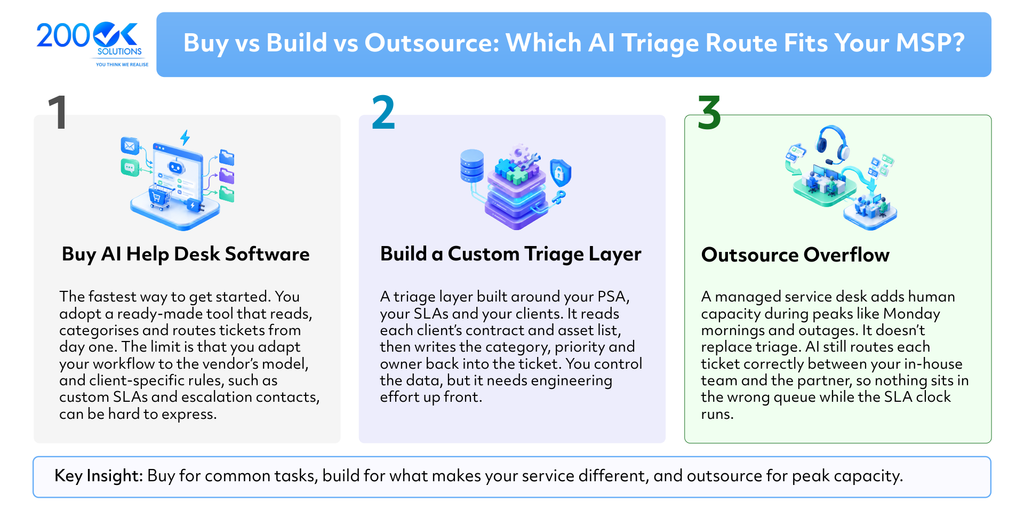
Think of an AI ticketing system as a layer, not a replacement. It sits between ticket intake and your queues, reading from and writing to your PSA.
Most modern PSA platforms expose APIs for tickets, contacts, configuration items, and SLAs. That is what makes the enrichment step possible. The AI reads the client’s contract and asset list, then writes back the category, priority, and owner. Your technicians keep working in the tool they already use.
A five-step rollout
- Audit 90 days of tickets : Find the top categories, the most common misroutes, and where SLAs were missed.
- Clean the taxonomy : Agree on a short list of categories and a clear priority matrix. AI cannot fix a category list nobody agrees on.
- Run in shadow mode : Let the AI make suggestions while humans triage as usual, then compare the results.
- Automate low-risk categories first : Turn on auto-routing only where the AI is confident, and send everything else to a dispatcher.
- Review weekly : Track first-response time, reassignment rate, SLA breaches, and how often technicians override the AI.
Mistakes to avoid
- Automating a messy taxonomy : Faster sorting into the wrong buckets is not progress.
- Skipping confidence thresholds : Low-confidence tickets should go to a person, not get a guess.
- Letting AI make security calls : Flag possible security incidents for a human every time.
- Ignoring client data boundaries : Keep each client’s data separated, and check where the model processes it, especially for UK and EU clients.
- Measuring only volume : Track response quality and override rates, not just how many tickets were handled automatically.
How 200OK Solutions can help
200OK Solutions is a custom software development company. We do not sell a packaged triage product. We build bespoke ones: a triage layer connected to your PSA and RMM, tuned to your client SLAs, with approval workflows, audit logs, and per-client data separation. If you want to pilot AI ticket triage without reshaping your service desk around a vendor’s tool, get in touch through 200oksolutions.com.
Frequently asked questions
Q. What is AI ticket triage?
A. AI ticket triage is the use of language models to read incoming support tickets and automatically set their category, priority, and owner. It replaces manual sorting by a dispatcher.
Q. How is it different from service desk automation?
A. Service desk automation is the broad category, covering rules, workflows, and templates. AI ticket triage is one part of it that handles the tasks needing language understanding.
Q. Will it replace dispatchers?
A. No. It removes the repetitive sorting, so dispatchers can focus on exceptions, major incidents, and client communication.
Q. How long does a pilot take?
A. It depends on your PSA and the quality of your ticket data. A shadow-mode pilot is usually measured in weeks, not months.
Q. Is it safe with client data?
A. It can be, if client data is kept separate, access is logged, and you know where the model processes information. Check this before you start.
You may also like : Microsoft Fabric for MSPs