

You can change your managed service provider (MSP) without downtime, lost data or a security gap, but only if you treat it as a planned project rather than a contract swap.
Most businesses stay with an underperforming MSP because switching feels risky: the provider holds your admin passwords, your documentation and the monitoring that keeps everything running. That fear is reasonable. A rushed MSP transition is where outages, locked-out accounts and unexpected bills come from.
This guide walks through six steps for switching managed service providers safely, from reading your contract to offboarding the old provider. It ends with a checklist you can copy into your own project plan.
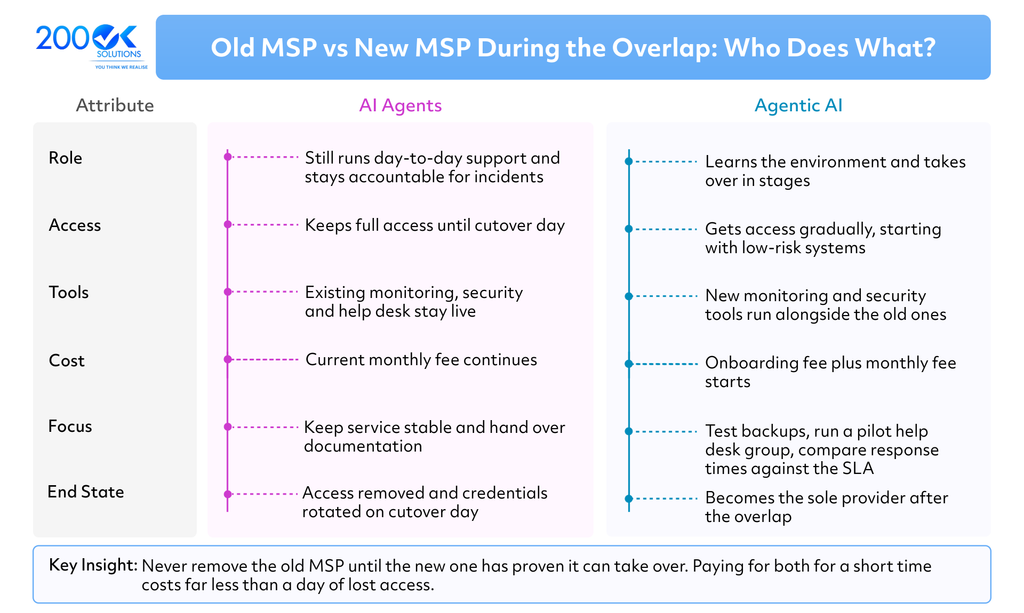
The overlap in step 5 is what keeps the switch safe: both providers are active until the new one has taken over.
The short answer: audit what you own, read your contract, choose a provider that is good at onboarding, plan the handover, run both providers side by side, then remove the old provider’s access and rotate every credential. Never give notice before the new provider is signed and ready.
Signs it is time to switch MSPs
Switch when problems repeat after you have raised them, not after a single bad week. The most common triggers are:
- Slow or inconsistent response. Tickets sit unanswered, or the same issue keeps coming back.
- SLA misses with no consequence. The service level agreement (SLA) promises response and resolution times, but nobody reports against it.
- Security concerns. Patching is late, backups are never tested, or you cannot get a straight answer about who has admin access.
- Pricing that no longer matches the work. Invoices grow through add-ons while the scope of service stays the same.
- No strategic input. You hear from your MSP only when something breaks, never about roadmaps, budgets or risks.
- Your business has outgrown them. New locations, compliance needs or cloud projects are beyond what they can support.
Before you decide, give your current provider a written list of issues and a deadline to fix them. Some problems are fixable, and the response tells you a lot about whether to stay.
Stay, fix or switch?
Not every problem justifies a move. Use this as a rough guide:
| Situation | Usual best move |
| One-off failure, good track record, quick fix | Stay, and document what happened |
| Repeated SLA misses, but the provider acknowledges them | Fix: agree a written improvement plan with a deadline |
| Security gaps or admin access you cannot verify | Switch, and start the audit now |
| Scope or compliance needs the MSP cannot support | Switch, or add a specialist provider |
| Price rises with no change in service | Renegotiate first, and get a competing quote |
Steps 1 and 2: Audit what you have and read your MSP contract
Step 1: Build your own inventory
Your MSP probably knows your environment better than you do, which is exactly the risk. Before you tell them anything, list what they manage for you:
- Users, devices, servers and cloud tenants (Microsoft 365, Google Workspace, AWS, Azure)
- Network equipment, firewalls, VPNs and Wi-Fi
- Backup and disaster recovery setups, and when each was last tested
- Security tools: antivirus or EDR, email filtering, MFA, password managers
- Third-party vendors the MSP manages on your behalf (internet providers, line-of-business software)
- Licences and who owns them: yours or resold through the MSP
If you cannot confirm ownership of a domain, licence or cloud account, find out now. Accounts registered under the MSP’s name are the single most common source of switching disputes.
Step 2: Read the MSP contract before you act
Your managed service provider contract decides how quickly and cheaply you can leave. Look for these clauses:
| Clause | What to check |
| Term and renewal | Does it auto-renew? How far in advance must you give notice? |
| Termination | Is early exit allowed, and what are the fees? |
| Transition assistance | Does the MSP have to help hand over, and is it billed? |
| Data and documentation | Who owns the documentation, passwords and configuration records? |
| SLA | What are the response and resolution targets, and what remedies apply when they are missed? |
| Pricing | Per-user or per-device fees, and charges for project work or offboarding |
Have a lawyer review the termination and data clauses if the contract is long or the stakes are high. Then set your notice date so that the new MSP is live before the old one is gone.
Steps 3 and 4: Choose the new MSP and plan the transition
Step 3: Pick a provider that is good at onboarding
A strong sales pitch says little about how well a provider takes over an existing environment. Ask each shortlisted MSP:
- How many MSP migrations like yours have you done, and can I speak to one of those clients?
- What does your onboarding process look like week by week?
- How do you document the environment, and will I have access to that documentation?
- What are your SLA targets, and how do you report against them?
- How is pricing structured, and what is not included? Compare managed service provider pricing on the full scope, not just the monthly fee.
- What are your exit terms if I ever leave you?
The last question matters most. A provider that makes leaving easy is usually confident about keeping you for the right reasons.
To compare providers fairly, score each shortlisted MSP from 1 (weak) to 5 (strong) on the same criteria:
| Criterion | MSP A | MSP B | MSP C |
| Onboarding process and references | |||
| Documentation handed to you | |||
| SLA targets and reporting | |||
| Security practices (patching, MFA, backup testing) | |||
| Pricing clarity, including what is excluded | |||
| Exit terms and transition assistance |
Step 4: Plan the MSP transition before you give notice
Write the plan with your new provider while the old one is still running. It should cover:
- Credentials and access. A list of every admin account, who holds it, and how it will be handed over or reset.
- Data and documentation. Network diagrams, asset lists, configuration records, licence keys and backup locations, exported in a usable format.
- Cutover order. Start with low-risk systems, such as monitoring and endpoint tools, and leave email, identity and firewalls for later once the team is comfortable.
- Communication. Who tells staff, who tells vendors, and how users will raise tickets during the change.
- Rollback. What you will do if a cutover step fails.
Most transitions take weeks rather than days, depending on size and complexity, so agree a realistic timeline with the new MSP and build in a buffer.
Steps 5 and 6: Run in parallel, cut over and offboard the old MSP
Step 5: Overlap the two providers
A short overlap period is the safest way to change MSP. Both providers have access, the new one learns the environment, and the old one is still accountable for incidents. Use it to:
- Let the new MSP deploy its monitoring and security tools alongside the old ones
- Test backups and restores with the new provider before the old one is removed
- Move users onto the new help desk gradually, starting with a pilot group
- Compare ticket handling and response times against the SLA
Expect to pay for both for a while. Estimate it simply: your old MSP’s fee, plus the new MSP’s onboarding and monthly fees, for as long as both run. Ask the new provider to quote onboarding separately, then compare that total with what even one day of lost access would cost your business.
The overlap ends on cutover day, when the old provider’s access is removed.
Step 6: Offboard the old provider securely
The contract ending does not mean access ending. Offboarding is a security task, so do not leave it to the old provider’s goodwill. On the cutover date:
- Rotate every admin password and service account, including shared and break-glass accounts.
- Remove the old MSP’s remote management agents from every device.
- Revoke their access to Microsoft 365, Google Workspace, cloud consoles, firewalls and VPNs.
- Remove them from vendor accounts, licence portals and domain registrar or DNS records.
- Confirm in writing that your data, documentation and credentials have been handed over, and that backups and copies they hold will be deleted.
- Review audit logs for unusual activity in the weeks after the switch.
Keep the relationship professional. You may need the old provider to answer a question months later.
Common mistakes and a switching checklist
The mistakes behind most failed transitions are avoidable:
- Giving notice before the new MSP is signed and ready
- Letting the MSP own your domain, licences or cloud accounts
- Skipping the overlap period to save a month of fees
- Assuming documentation exists, then finding out at handover that it does not
- Forgetting to remove the old provider’s access afterwards
- Telling staff nothing, then dealing with a flood of confused tickets
An illustrative scenario (not a real client). A company gives notice to its MSP before the replacement has started. The old provider winds down, ticket response slows, and nobody can confirm who holds the firewall login or owns the domain registration. The new provider starts without documentation and spends its first weeks rediscovering the environment. Each of these problems comes from skipping a step in this guide: the audit, the contract check, or the overlap.
Copy this checklist into your own plan:
- ☐ Written list of issues sent to the current MSP, with a deadline
- ☐ Inventory of systems, accounts, licences and vendors complete
- ☐ Contract reviewed: notice period, exit fees, data ownership, SLA
- ☐ New MSP shortlisted and questioned on onboarding and exit terms
- ☐ Transition plan agreed: access, documentation, cutover order, rollback
- ☐ Notice given on a date that leaves time for overlap
- ☐ Credentials and documentation received and verified
- ☐ Backups restored successfully by the new provider
- ☐ Staff informed and help desk contact changed
- ☐ Old MSP access removed and all admin credentials rotated
- ☐ Written confirmation of data handover and deletion received
FAQ
Q. How long does it take to switch MSPs?
A. It depends on your size and how well the environment is documented. A small business with clean documentation can move in a few weeks. Larger or messier environments take longer. Plan the timeline with your new provider, and add a buffer.
Q. What should an MSP offboarding checklist include?
A. At minimum: credential rotation, removal of management agents, revoked access to cloud and vendor accounts, handover of documentation, and written confirmation that your data has been returned or deleted.
Q. Can I switch MSPs before my contract ends?
A. Often yes, but usually with a fee or a notice requirement. Check the termination clause in your managed service provider contract, and ask a lawyer if the terms are unclear.
Q. Will there be downtime when I change MSP?
A. Not if the transition is planned. Running both providers in parallel and cutting over in stages is what prevents it.
Conclusion
Changing your managed service provider is a controlled project, not a leap of faith. Know what you own, read the contract, choose a provider that is good at onboarding, overlap the two for a short period, and treat offboarding as a security task. Done in that order, the switch protects your business instead of putting it at risk.
Planning an MSP transition? Send 200OK Solutions your current contract and system inventory, and we will review your transition plan before you give notice.
You may also like : AI Ticket Triage for MSPs: How Service Desk Automation Speeds Up Response Times