
PHP security vulnerabilities in 2026 stopped being a background worry on October 21, when the PHP project shipped emergency fixes for two critical remote code execution (RCE) flaws: CVE-2026-109618 and CVE-2026-109619, nicknamed PHP2Shell. Both score 9.2 (Critical) on CVSS v4.0, both sit inside the PHP engine itself rather than in your application code, and attackers were probing for them before patches were public.
This guide explains what the flaws are, which PHP versions are affected, who is really at risk, and exactly how to fix or contain the problem today, whether you run a single WordPress site, a Laravel app in containers, or a fleet of servers.
Key takeaways
- Patch now: upgrade to PHP 8.5.12, 8.4.27, 8.3.36 or 8.2.35, then restart PHP-FPM, Apache or whatever process actually serves requests.
- PHP 8.1 and older will not get an upstream fix. If you are on an end-of-life branch, you must move to a supported version.
- Your CMS is not the fix. WordPress, Drupal, Joomla, Magento, WooCommerce and Laravel all run on the vulnerable engine. Plugin and framework updates do not close this hole.
- Containers and managed platforms need a rebuild or redeploy, not just a package update on the host.
- If you cannot patch today, apply the stopgap settings, WAF rules and sandboxing in this guide, and treat them as temporary.
What are the PHP security vulnerabilities of 2026?
The headline event is PHP2Shell: two memory-safety bugs in PHP’s core that can let an unauthenticated attacker run code on a web server. Researchers from Calif, Wiz Research and OpenAI reported the underlying problems to the PHP security team in August 2026, and coordinated fixes were released on October 21, 2026.
Two details make this one different from a routine PHP CVE:
- The flaws had existed for years. Wiz said the bugs were long-standing, but chaining them into a working exploit was extremely hard. Frontier AI models lowered that barrier, which is why researchers expect more engine-level bugs to be found this way.
- The disclosure leaked. The CVE IDs began circulating on October 20, ahead of schedule, so the PHP project moved its release up by a day. Amazon’s honeypot network had already logged an exploitation attempt on October 17, and other vendors reported early attacks on release day.
CVE-2026-109618 and CVE-2026-109619 explained
| CVE-2026-109618 | CVE-2026-109619 | |
| Nickname | PHP2Shell (OOM variant) | PHP2Shell (stale-state variant) |
| Root cause | An out-of-memory condition interrupts PHP while request data is only partly initialized, and cleanup then trusts the broken data | Request-owned internal state survives after its memory is freed, and a later request on the same worker reuses it |
| Weakness class | Use of an uninitialized pointer (CWE-824) | Use of an uninitialized pointer (CWE-824), use-after-free behavior |
| Severity | 9.2 Critical (CVSS v4.0) | 9.2 Critical (CVSS v4.0) |
| Impact | Remote code execution, server memory disclosure, worker crashes | Remote code execution |
| Authentication needed | None | None |
| Notable conditions | Triggered by oversized or deeply nested multipart requests | Relies on session upload progress being enabled (it is on by default) and on attacker requests reaching the same worker; one code path applies to PHP 8.5 only |
How hard is it to exploit? Reports differ. The PHP Foundation said code execution was demonstrated before application code even runs on Apache with mod_php using default settings, and through application code paths on PHP-FPM. Another research group found that some public proof-of-concept exploits fail against a default installation. Do not read that as a reason to wait: exploit code is public, scanning is under way, and the fix is a routine upgrade.
Affected PHP versions and patched releases
| PHP branch | Status | Fixed in |
| 8.5 | Supported | 8.5.12 |
| 8.4 | Supported | 8.4.27 |
| 8.3 | Supported | 8.3.36 |
| 8.2 | Security support only (ends December 31, 2026) | 8.2.35 |
| 8.1 and older (8.0, 7.x, 5.x) | End of life | No upstream fix |
Google Cloud’s advisory lists every release from PHP 5.4 through 8.5.11 as vulnerable. If you run an end-of-life branch, the safe answer is to upgrade to a supported branch. Some Linux distributions backport fixes into older packages, so check your vendor’s security tracker, but do not count on that as a long-term plan.
Planning note: PHP 8.2 stops receiving security fixes at the end of 2026. If you are patching 8.2 today, schedule your move to 8.3, 8.4 or 8.5 now so you are not repeating this scramble in January.
Who is at risk?
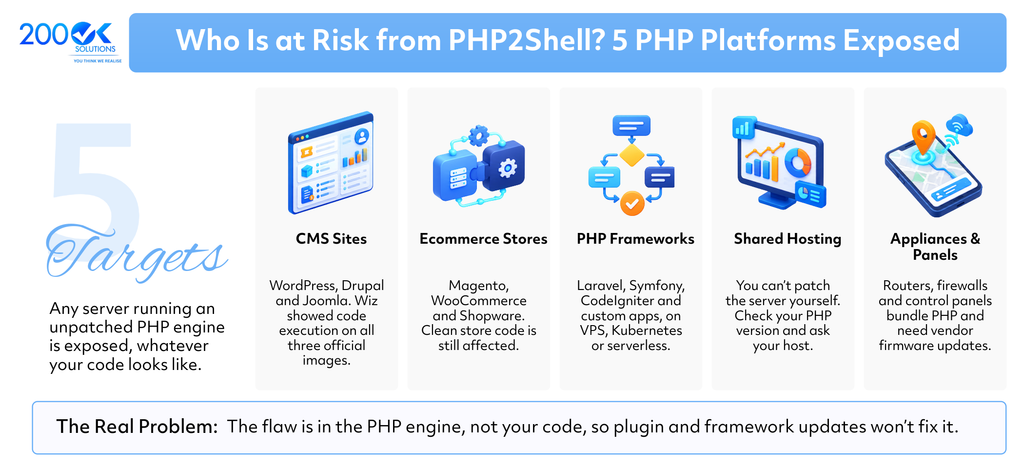
Any server that processes web requests with an unpatched PHP engine is exposed. That includes:
- WordPress, Drupal and Joomla sites. Wiz demonstrated unauthenticated code execution against the official container images of all three.
- Ecommerce platforms such as Magento, WooCommerce and Shopware. The flaw is in the runtime, so a store with perfectly clean code is still affected.
- Laravel, Symfony, CodeIgniter and custom PHP apps, on VPS, bare metal, Kubernetes or serverless.
- Shared and managed hosting. You cannot patch the server yourself, but you can check the PHP version and ask your host for its timeline.
- Appliances and admin panels. Routers, firewalls, storage devices and control panels often bundle PHP and need vendor firmware updates.
The UK’s National Cyber Security Centre advised organizations to identify every PHP system, prioritize internet-facing ones, and consider taking a system offline if it cannot be fixed or mitigated quickly.
PHP2Shell timeline
- August 2026: Calif, Wiz Research and OpenAI independently find the issues and report them to the PHP security team.
- October 17: Amazon’s honeypot network records an exploitation attempt.
- October 20: CVE IDs leak publicly; PHP moves its pre-announcement and release forward.
- October 21: PHP 8.5.12, 8.4.27, 8.3.36 and 8.2.35 are released; vendors publish advisories and detection rules.
- Since then: proof-of-concept exploits and scanners have appeared on public repositories.
How to check whether your PHP is vulnerable
Run these on every server, container and CI image that serves PHP.
1. Find the PHP version and server API
php -v
php -i | grep -E "^Server API|session.upload_progress.enabled"
The command-line version can differ from the one your web server uses. Check the version your website actually runs, for example with a temporary phpinfo() page protected by IP restriction, which you delete immediately afterward. On WordPress, open Tools, then Site Health, then Info, then Server.
2. Confirm the fix on Debian or Ubuntu
Distributions often keep the same version number and backport the patch, so the version string can mislead. Check the changelog instead:
apt-get changelog php-fpm | grep -E "CVE-2026-109618|CVE-2026-109619" On RHEL-family systems, use rpm -q –changelog php-fpm | grep -E “CVE-2026-109618|CVE-2026-109619”.
3. Check that running workers were restarted
Upgrading the package on disk does not replace code already loaded in memory. Confirm the process start time is after your upgrade:
ps -o pid,lstart,cmd -C php-fpm8.3,apache2 Third-party scanners for these CVEs exist on GitHub. Only run one against systems you own, and review its code first, because several of the public repositories bundle exploit code.
How to fix PHP2Shell: step-by-step patch checklist
- Inventory every PHP deployment. Web servers, Docker images, CI runners, staging boxes, admin panels and vendor appliances.
- Upgrade to a fixed release for your branch (8.5.12, 8.4.27, 8.3.36 or 8.2.35), using your distribution’s official security repository or an official source build. Third-party mirrors may lag behind a coordinated disclosure.
- Restart the process that serves requests: php8.x-fpm, apache2 or httpd, FrankenPHP, or LiteSpeed, including any supervisor-managed workers.
- Rebuild and redeploy containers. Pull a patched base image, rebuild with caching disabled, and roll out new pods or services. Updating packages on the host does nothing for a container that bundles its own PHP.
- Handle managed platforms. On serverless and platform-as-a-service products, confirm whether base images update automatically or whether you must redeploy. Services built from your own container image are your responsibility.
- Move off end-of-life PHP. If you are on 8.1 or older, schedule an upgrade to a supported branch, test your application against it, and ship it. There is no upstream patch coming.
- Verify. Re-run the checks above, confirm the changelog or version, and re-scan your external surface.
Suspect you were already hit? Capture worker memory and logs before you restart or reboot, because restarting destroys volatile evidence you may need for an investigation.
If you cannot patch today: temporary mitigations
These reduce exposure while you schedule the upgrade. They are not a substitute for patching.
1. Harden php.ini
Put these settings in the main php.ini or your static PHP-FPM pool configuration, not in .htaccess or per-request overrides, then restart all workers:
; Stopgaps only. Upgrade PHP as soon as possible.
session.upload_progress.enabled = 0
fatal_error_backtraces = 0        ; PHP 8.5 only
post_max_size = 8M
upload_max_filesize = 4M
max_input_nesting_level = 16
max_input_vars = 250
max_file_uploads = 10
expose_php = Off
display_errors = Off
log_errors = On
; If the service never accepts uploads:
; file_uploads = Off
Hiding error output alone does not stop memory disclosure, so keep the rest of the list in place.
2. Add edge and WAF controls
Because multipart requests are parsed before your code runs, your reverse proxy or WAF is the best early line of defense:
- Block multipart/form-data on routes that do not need file uploads.
- Enforce a small request body limit on non-upload routes and reject chunked POST requests where possible.
- Block deeply nested bracketed field names in form data.
- Reject PHPSESSID cookies that are not a normal-length alphanumeric session ID.
- Restrict direct internet access to unpatched servers so traffic can only arrive through the WAF.
Managed WAF vendors, including Google Cloud Armor and Cloudflare, published rules for these CVEs. Enable the relevant managed ruleset rather than hand-writing everything.
3. Sandbox the PHP process
- Run PHP under a dedicated unprivileged user with a read-only web root.
- Limit memory with container or cgroup controls rather than ulimit -v, which can push PHP into the vulnerable out-of-memory path.
- Block outbound internet access from PHP servers and stop PHP workers from spawning shells or tools like curl and wget.
How to tell if you were targeted
Hunt for these signals in web, proxy and endpoint logs:
| Where | What to look for |
| Response headers or WAF egress logs | Set-Cookie: PHPSESSID values far longer than normal (over 256 characters), which can indicate memory leakage |
| Endpoint or auditd telemetry | Shells, curl, wget, nc or python launched as child processes of php-fpm, apache2 or httpd |
| Web access logs | Repeated .php/ path segments returning 404, or bursts of alternating 500 and 200 responses to the same POST endpoint |
| Host metrics | Spikes in PHP-FPM worker crashes (segfault, exit code 139) or core dumps |
| Apache logs | Many persistent OPTIONS * keep-alive connections, or slow chunked multipart POST requests |
Note that a successful attack may leave no crash and no error-log entry, so absence of evidence is not proof of safety. If anything looks suspicious, isolate the host, preserve memory and logs, rotate secrets stored on it, and reinstall from a known-good image.
Beyond PHP2Shell: other PHP vulnerabilities still hitting sites in 2026
PHP2Shell is an engine bug, but most real-world PHP breaches still come from application code and outdated components. These classes keep appearing in scans and incident reports:
| Vulnerability | What goes wrong | Fix |
| SQL injection | User input is concatenated into queries | Use prepared statements (PDO or mysqli) everywhere; never build SQL from raw input |
| Code and command injection | Input reaches eval, exec, system or include | Remove those calls, allow-list inputs, and use disable_functions where you can |
| Insecure file upload | Attackers upload executable files or oversized payloads | Validate type and size server-side, store uploads outside the web root, and never execute them |
| Object injection (unsafe unserialize) | Untrusted serialized data triggers gadget chains | Use JSON, or pass allowed_classes and sign serialized data |
| Cross-site scripting (XSS) | Unescaped output runs attacker scripts | Escape output by context, and set a Content Security Policy |
| Session hijacking and CSRF | Stolen or forged sessions | Use secure, HTTP-only, SameSite cookies, regenerate IDs on login, and use CSRF tokens |
| Vulnerable dependencies | Old Composer packages with known CVEs | Run composer audit in CI and update regularly |
| Information disclosure | phpinfo(), debug pages and verbose errors reveal internals | Remove debug endpoints and turn off display_errors in production |
PHP security best practices checklist for 2026
- Run only supported PHP versions, and track each branch’s end-of-life date.
- Subscribe to the PHP security announcements and your distribution’s security feed.
- Keep PHP, web server, OS and Composer dependencies on an automated patch schedule.
- Rebuild container images weekly and on every critical advisory.
- Put a WAF in front of every public PHP application.
- Apply least privilege: unprivileged PHP user, read-only code, restricted egress.
- Run static analysis and dependency scanning in CI.
- Keep logs and detections that cover PHP worker behavior, not just application errors.
- Practice your emergency patch process before you need it. PHP2Shell gave defenders roughly a day of warning.
Frequently asked questions
Q. What is PHP2Shell?
A. PHP2Shell is the nickname for CVE-2026-109618 and CVE-2026-109619, two critical memory-safety flaws in the PHP engine that can allow unauthenticated remote code execution. Both are rated 9.2 on CVSS v4.0.
Q. Which PHP versions are affected by CVE-2026-109618 and CVE-2026-109619?
A. The fixes landed in PHP 8.5.12, 8.4.27, 8.3.36 and 8.2.35, so earlier releases on those branches are vulnerable. Google Cloud’s advisory lists everything from PHP 5.4 through 8.5.11 as affected, and the end-of-life branches will not receive official patches.
Q. Is PHP 8.1 vulnerable, and will it be patched?
A. PHP 8.1 is out of support, so the PHP project is not releasing a fix for it. Upgrade to a supported branch, or confirm with your Linux vendor whether it ships a backported patch.
Q. Do I need to patch if I use WordPress, Laravel or Magento?
A. Yes. The vulnerability is in the PHP runtime beneath those platforms, so plugin, theme or framework updates do not remove it. You must update PHP itself.
Q. I am on shared hosting. What should I do?
A. Check your PHP version in your hosting panel (or WordPress Site Health), then ask your provider when the patched PHP will be live and whether workers have been restarted. If your host cannot give a clear answer, consider moving to one that can.
Q. Can I mitigate this without upgrading?
A. Partly. Disabling session upload progress, tightening upload and input limits, and adding WAF rules reduce exposure, but they do not fix the underlying bugs. Treat them as a bridge to the upgrade.
Q. Has PHP2Shell been exploited in the wild?
A. Yes. Security vendors reported exploitation attempts before and immediately after the patches were released, and public proof-of-concept code is now available.
Conclusion: patch, restart, then verify
The PHP security vulnerabilities of 2026 are a reminder that your runtime is part of your attack surface. For PHP2Shell the playbook is simple: upgrade to PHP 8.5.12, 8.4.27, 8.3.36 or 8.2.35, restart the serving processes, rebuild your containers, retire end-of-life versions, and watch your logs for signs of earlier probing. Then use the breathing room to build the habits that make the next emergency a non-event.
Need help auditing your PHP estate, upgrading end-of-life applications, or hardening your hosting? 200OK Solutions builds and modernizes custom software, and can help you move to a supported, secure PHP stack without breaking production.