
Quick answer: To set up Meta Muse, check that you are a US adult, complete the Meta Muse download, finish the Meta Muse sign up, log in, review the privacy settings, connect one service such as Gmail, and give it a small first task. Meta Muse is free to start, but it is not yet available outside the US.
What Is Meta Muse?
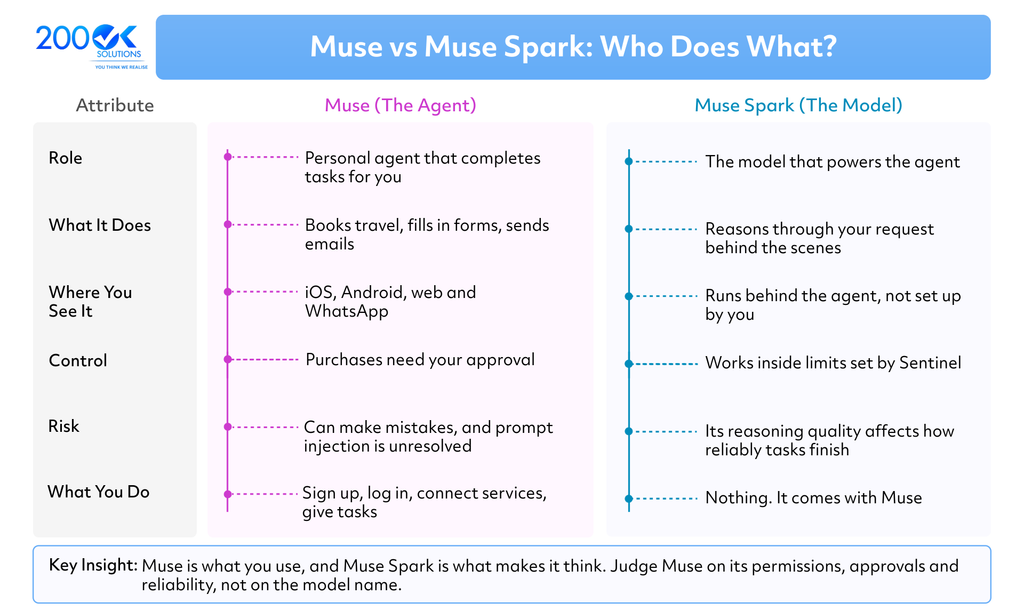
Meta Muse is a personal AI agent that completes tasks for you instead of only answering questions. Meta announced it on 8 September 2026. It can book travel, fill in online forms and send emails, and it keeps working in the cloud after you close the app. Muse is the agent, and Muse Spark is the model behind it.
This Meta Muse tutorial covers the full Meta Muse AI agent setup, from download to your first task. For a wider look at features, pricing and risks, read our explainer on the Meta Muse AI agent.
Who Can Use Meta Muse Right Now?
At launch, Meta Muse is limited to adults aged 18 and over in the US. You can use it on iOS, Android, the web and WhatsApp. Meta says more countries will follow, but UK users should not assume access today.
If you are outside the US, you cannot complete the Meta Muse sign up yet. We could not confirm an official Meta Muse waitlist, so check muse.ai and Meta’s newsroom for updates rather than trusting third-party waitlist pages.
What You Need Before You Start
- A US-based adult account holder.
- A phone with iOS or Android, or a web browser.
- A payment card, which press reports say signup may ask for even on the free plan.
- One first task you can easily check yourself.
How to Set Up Meta Muse: 7 Steps
This is how to set up Meta Muse based on Meta’s published documentation and early press coverage. We have not verified every live screen, so menu names may differ slightly. The Meta Muse setup is short, and most of the care goes into steps 5 and 6.
- Confirm you are eligible : You need to be a US adult. Outside the US, stop here and watch for rollout news.
- Complete the Meta Muse download : Get the app from the iOS App Store or Google Play, or open the web version at muse.ai. Use Meta’s official links only, since new AI products attract fake apps.
- Finish the Meta Muse sign up : TechCrunch reports that signup asks for a payment card, even for free access. Read that screen carefully before you continue.
- Complete your Meta Muse login : Log in with the account you created. If login fails and you are outside the US, availability is the most likely cause.
- Review the privacy settings : Meta says eligible interaction data is used for model training by default, with an opt-out in settings. Decide before you connect anything.
- Connect one service : Start with a single app. A Meta Muse Gmail connection is a common first choice, and Meta documents controls over whether email access can only read or can also send.
- Give it a small first task : State the outcome, the limits and what you want to approve.
Prefer messaging? Meta Muse WhatsApp access works the same way for the main conversation. The WhatsApp version leaves out some app-only extras, such as the customisable feed and the ideas section.
Meta Muse Privacy Settings to Check
Meta describes a separate system called Sentinel that controls permissions and keeps credentials apart from the agent. Purchases need your approval. Meta also says Muse conversations are not shared with its advertising systems, although activity on websites can indirectly affect advertising.
Two cautions apply. The launch version does not stop Meta accessing data when needed to run, support or secure the service. A Confidential VM option, designed to prevent that, is planned for later this year. Meta also admits Muse will sometimes make mistakes and that prompt injection, where hostile web content tries to steer an agent, is unresolved.
Meta Muse Free vs Paid Plans
Meta Muse free is a real option, so start there. Personal AI agent free tiers are still rare, which makes it worth testing. The launch plans were:
| Plan | Price | Best for |
| Free | $0 a month | Trying a few recurring tasks |
| Power | $20 a month | Regular daily use |
| Maximum | $100 a month | Heavy, continuous use |
Plan names and prices come from TechCrunch’s launch report. Usage allowances are measured in tokens, which do not map neatly to a number of tasks, so check your account before upgrading.
How to Use Meta Muse: Your First Tasks
If you are wondering how to use Meta Muse day to day, think of it as a delegate. This section works as a short Muse AI agent tutorial. It also shows how to use Muse AI agent features and how to use AI agents safely in general.
- Start with low-risk work : Ask it to research, compare or list. Try: “Review my calendar for next week and suggest three 45-minute focus blocks. Do not create or move any events yet.”
- Set limits in the prompt : Give a budget, a deadline and a rule that it must ask before it buys or sends anything.
- Approve before it acts : Checkout runs through Stripe’s Link, and purchases need your sign-off.
- Add connections slowly : Expand only after the first tasks go well.
Is Meta Muse the Best Personal AI Agent?
There is no single best personal AI agent for everyone. Judge any personal AI agent app on five things: which services it connects to, how granular the permissions are, whether it asks before spending money, what happens to your data, and whether it finishes tasks reliably.
Muse scores well on ease: a free tier, messaging access and no configuration. Its limits are US-only availability and the data-access caveat above. For personal errands it is a strong agent to test. For business processes it is not built around your systems.
How to Create a Personal AI Agent of Your Own
Muse is ready-made. If you need an agent that works inside your own systems, you need to know how to create an AI agent or commission one. Here is how to build a personal AI agent, or a business one, in five stages. It doubles as an AI agent for beginners overview.
- Pick one job. Choose a task with a clear finish line, such as triaging support emails.
- Choose a model and tools. Decide which AI model reasons and which systems it may read or change.
- Do the AI agent setup. Connect data sources and APIs, and store credentials separately from the agent.
- Set permissions and approvals. Define what the agent may do alone and where a human signs off.
- Test, monitor and roll back. Log every action and keep a way to undo changes.
Teams that want to set up personal AI agent assistants for staff, or a custom agent across the business, can work with us. 200OK Solutions is a UK software engineering partner working since 2011. Our Intelligent Business Transformation and Platform Engineering services connect the systems an agent depends on. We do not sell packaged products; we build around your processes.
Frequently Asked Questions
Q. How do I set up Meta Muse?
A. Check you are a US adult, complete the Meta Muse download, sign up, log in, review privacy settings, connect one service and give it a small task.
Q. Is there a Meta Muse waitlist?
A. We could not confirm an official waitlist. At launch, US adults could sign up directly. Check muse.ai for updates.
Q. Is Meta Muse free?
A. Yes, there is a free plan with usage limits. Paid plans were reported at $20 and $100 a month.
Q. Can I use Meta Muse on WhatsApp?
A. Yes. Meta says you can talk to your agent through WhatsApp as well as the app.
Q. Can Meta Muse connect to Gmail?
A. Gmail is one of the reported integrations, with permission controls for reading and sending.
Q. What if my Meta Muse login does not work?
A. Log in with the account from your sign-up. Outside the US, a failed Meta Muse login most likely means the service is not yet available to you.
Q. Is Meta Muse available in the UK?
A. Not at launch. Meta says more countries will follow.
Q. How do I use Meta Muse safely?
A. Start with low-risk tasks, connect one service at a time and review every action.
Final Thoughts
Meta Muse AI agent setup is short, but the real work is deciding what to trust it with. Start small, connect one service and check results before expanding. Use this Meta Muse tutorial as a checklist, and revisit your Meta Muse setup whenever you add a new connection. If you want an agent built around your own systems rather than a consumer app, talk to 200OK Solutions.