

Why AI Integration Is the Defining Laravel Trend of 2026
Laravel has always been about developer happiness, elegant syntax, expressive APIs, and conventions that make complex things feel simple. In 2026, that philosophy is colliding head-on with the AI era.
According to JetBrains’ State of PHP survey, Laravel is used by 64% of PHP developers, and AI integration has emerged as the single most cited trend in the Laravel ecosystem this year. Businesses are no longer asking whether to add AI to their applications, they’re asking how to do it cleanly, without locking themselves into a single provider.
Enter Prism PHP: the Laravel-native package that does for AI what Eloquent did for databases, wraps away the complexity behind a beautiful, fluent interface.
What Is Prism PHP?
Prism PHP is a unified interface for working with Large Language Models (LLMs) in Laravel. Inspired by the Vercel AI SDK in the JavaScript world, it gives you a single, provider-agnostic API to interact with:
- OpenAI (GPT-4o, GPT-4 Turbo, etc.)
- Anthropic (Claude Sonnet, Claude Opus, etc.)
- Google Gemini (multi-modal text, image, audio, video)
- Ollama (local models, perfect for dev environments with zero API cost)
- Mistral, XAI, and more
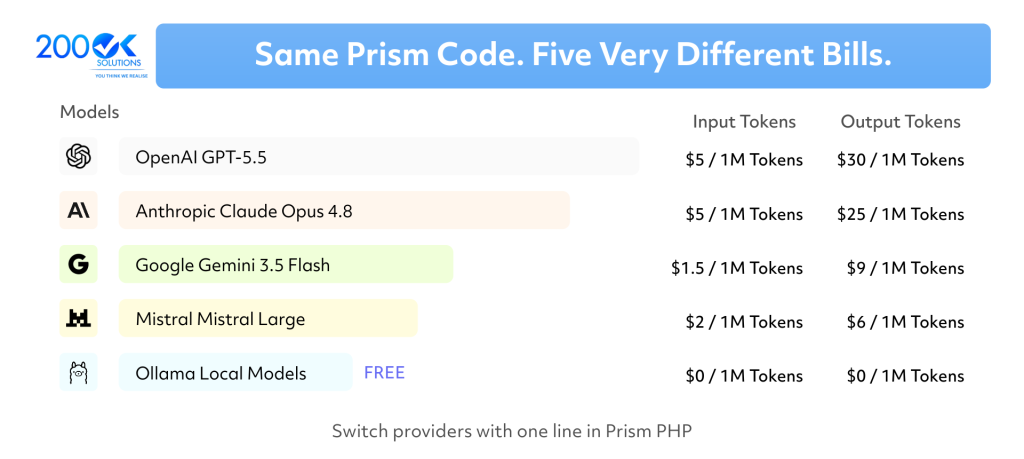
The core idea is simple: you write your application code once, and you can switch providers by changing a single line. No refactoring, no rewriting service classes, no new SDKs to learn.
Installation
composer require prism-php/prism
php artisan vendor:publish --tag=prism-config
That’s it. You’re ready to generate your first AI response.
OPENAI_API_KEY=sk-...
ANTHROPIC_API_KEY=sk-ant-...
Core Feature 1: Text Generation with a Fluent API
Prism’s chainable API feels immediately familiar to any Laravel developer. Here’s how you generate text:
use Prism\Prism\Facades\Prism;
use Prism\Prism\Enums\Provider;

$response = Prism::text()
    ->using(Provider::OpenAI, 'gpt-4o')
    ->withSystemPrompt('You are a helpful customer support agent.')
    ->withPrompt('How do I reset my password?')
    ->generate();

echo $response->text;
To switch to Claude, you change one line:
->using(Provider::Anthropic, 'claude-sonnet-4-6')Your controller, your service class, your tests, all remain unchanged. This is the kind of abstraction that makes Prism genuinely useful in production.
Core Feature 2: Streaming Responses
For chat interfaces or anything where you want real-time output, Prism supports streaming out of the box:
public function streamAnswer(Request $request): Response

{
    return response()->stream(function () use ($request) {
        $stream = Prism::text()
            ->using(Provider::OpenAI, 'gpt-4o')
            ->withPrompt($request->input('question'))
            ->asStream();
        foreach ($stream as $chunk) {
            echo $chunk->text;
            ob_flush();
            flush();
        }
    }, 200, [
        'Content-Type' => 'text/event-stream',
        'Cache-Control' => 'no-cache',
    ]);
}
Pair this with a simple Alpine.js or Livewire frontend and you have a ChatGPT-style interface in your Laravel app within minutes.
Core Feature 3: Structured Outputs
One of the most painful parts of raw LLM API work is getting back unstructured text and then trying to parse it into usable data. Prism solves this with structured outputs, define a schema, and you get back a proper PHP associative array:
use Prism\Prism\Schema\ObjectSchema;
use Prism\Prism\Schema\StringSchema;
use Prism\Prism\Schema\NumberSchema;
$schema = new ObjectSchema(
    name: 'product_review',
    description: 'A structured product review',
    properties: [
        new StringSchema('sentiment', 'Positive, neutral, or negative'),
        new NumberSchema('score', 'Sentiment score from 0 to 10'),
        new StringSchema('summary', 'One-sentence summary'),
    ],
    requiredFields: ['sentiment', 'score', 'summary']
);
$response = Prism::structured()
    ->using(Provider::OpenAI, 'gpt-4o')
    ->withSchema($schema)
    ->withPrompt('Review: "The app crashes on file upload. Love the UI."')
    ->asStructured();
// $review['sentiment'] => "negative"
// $review['score']     => 3
// $review['summary']   => "Crashes on file upload despite an appealing interface."
No more regex hacks, no more json_decode() on vague AI output. You define the contract, Prism enforces it.
Core Feature 4: Tool Calling
Tool calling is where AI stops being a text generator and starts being an autonomous agent that can interact with your application. Here’s a real-world example: a customer support bot that can actually look up order status:
use Prism\Prism\Tool;
$orderLookupTool = Tool::as('get_order_status')
    ->for('Look up the current status of a customer order')
    ->withStringParameter('order_number', 'The order number to look up')
    ->using(function (string $order_number): string {
        $order = Order::where('number', $order_number)->first();
        if (!$order) {
            return json_encode(['error' => 'Order not found']);
        }
        return json_encode([
            'status'             => $order->status,
            'estimated_delivery' => $order->estimated_delivery->toDateString(),
            'tracking_number'    => $order->tracking_number,
        ]);
    });
$response = Prism::text()
    ->using(Provider::Anthropic, 'claude-sonnet-4-6')
    ->withSystemPrompt('You are a customer support agent.')
    ->withPrompt('What is the status of order ORD-2026-8821?')
    ->withTools([$orderLookupTool])
    ->generate();
The AI reads the user message, calls get_order_status, gets real data from your database, and writes a natural-language response. The AI is now actually useful.
Core Feature 5: Blade Templates as Prompts
One of Prism’s most underrated features is using Blade templates as prompts. This keeps your prompts maintainable, version-controlled, and properly separated from business logic:
{{-- resources/views/prompts/summarise-ticket.blade.php --}}
You are a senior support agent. Summarise the following support ticket
in 2-3 sentences for a manager's dashboard.
Customer: {{ $customer->name }} ({{ $customer->plan }} plan)
Ticket created: {{ $ticket->created_at->diffForHumans() }}
---
{{ $ticket->body }}
$response = Prism::text()
    ->using(Provider::Anthropic, 'claude-sonnet-4-6')
    ->withPrompt(view('prompts.summarise-ticket', [
        'customer' => $customer,
        'ticket'   => $ticket,
    ])->render())
    ->generate();
No more concatenated strings. No more heredoc nightmares. Just Blade, the templating system your team already knows.
Prism Server: Expose Your Models as an API
Prism Server exposes your Prism-powered models through an OpenAI-compatible API. Any tool or SDK that speaks OpenAI’s protocol can interact with your custom Laravel AI models.
// config/prism.php
'prism_server' => [
    'enabled'    => env('PRISM_SERVER_ENABLED', false),
    'middleware' => ['auth:sanctum'],
],
// AppServiceProvider.php
PrismServer::register(
    'support-agent',
    fn () => Prism::text()
        ->using(Provider::Anthropic, 'claude-sonnet-4-6')
        ->withSystemPrompt('You are a support agent for Acme Corp...')
);
Your model is now available at /prism/openai/v1 with full OpenAI API compatibility.
Testing AI Features Without Burning API Credits
Prism ships with a fake/mock system that makes testing AI features a first-class experience:
it('summarises a support ticket correctly', function () {
    $fake = Prism::fake([
        new \Prism\Prism\Testing\TextResult(
            text: 'Customer cannot log in due to MFA issue. High urgency.',
            usage: new Usage(inputTokens: 120, outputTokens: 20),
        ),
    ]);
    $summary = app(TicketSummariser::class)->summarise($ticket);
    expect($summary)->toBe('Customer cannot log in due to MFA issue. High urgency.');
    $fake->assertCallCount(1);
    $fake->assertPromptContains('MFA');
});
No network calls. API keys aren’t required. Flaky tests become a thing of the past. As a result, your CI pipeline stays fast, reliable, and deterministic.
When to Use Which Provider
| Use Case | Recommended Provider |
| General text generation, Q&A | OpenAI GPT-4o |
| Long document analysis, nuanced writing | Anthropic Claude |
| Multi-modal (images, audio, video) | Google Gemini |
| Local dev, zero API cost | Ollama (llama3, qwen2.5) |
| Cost-sensitive high-volume tasks | Ollama or Mistral |
The beauty of Prism is that this decision is reversible. You’re never locked in.
Real-World Architecture: AI-Powered SaaS Feature
Keep your Prism calls inside service classes, never in controllers. This keeps your code testable, swappable, and aligned with Laravel’s service container philosophy.
HTTP Request

    │
    ▼
Controller (thin — validates input only)
    │
    ▼
AIFeatureService (injected via DI)
    │  ├── Composes the Prism call
    │  ├── Attaches tools (database lookups, API calls)
    │  └── Returns typed DTO
    │
    ▼
Prism PHP
    │  ├── Sends to configured provider
    │  ├── Handles tool calling loop
    │  └── Returns structured/text response
    │
    ▼
Response (JSON API or Livewire/Inertia update)
The 15-Minute Quickstart
- composer require prism-php/prism
- Add API keys to .env
- Create a service class with a Prism call
- Write a Blade prompt template
- Wire up a controller and route
- Write a Pest test using Prism::fake()
- Deploy, same as any Laravel app, no special infrastructure needed
No Python or separate microservice required. You only need Laravel, Prism, and an API key to get started.
Conclusion
AI is no longer something Laravel developers ‘plan for later.’ In 2026, it’s a core layer of modern web applications, and Prism PHP is the most Laravel-native way to build it.
It gives you provider flexibility, Eloquent-style fluency, Blade-native prompt templates, streaming, structured outputs, tool calling, embeddings, and first-class testing support, all in a package that feels like it shipped with the framework.
Whether you’re adding a simple AI-powered feature to an existing app or architecting a new SaaS product with intelligence at its core, Prism is the foundation worth building on.
Resources
- Prism PHP Documentation: prismphp.com
- GitHub: github.com/prism-php/prism
- Laravel News: laravel-news.com/prism-ai-laravel
You may also like: Modular Monolithic Architecture in Laravel 12