
Most businesses have stopped asking whether to use AI. The real question now is which AI chatbot fits how your team works.
ChatGPT, Claude, Gemini and Microsoft Copilot are often treated as the same thing. They are not. Each one is built around different strengths: writing and versatility, long documents, Google Workspace, or Microsoft 365. Each also handles security and integration differently.
This AI chatbot comparison will help you choose the best AI chatbot for business. It covers small teams, growing companies and larger organizations. It also covers the wider question of the best AI tools for business, because most teams end up using more than one.
Quick Answer: Which Is the Best AI Chatbot for Business?
There is no single best AI chatbot for every business. The right answer depends on the software you already use and the work you need done.
| AI Tool | Best For | Key Strength |
| ChatGPT | Broad business and technical tasks, custom assistants | Versatility and a large ecosystem of connectors and agents |
| Claude | Long documents, careful analysis, writing and coding | Handles long, complex content well |
| Gemini | Google Workspace and multimodal workflows | Built into Gmail, Docs, Sheets and Meet |
| Microsoft Copilot | Microsoft 365 teams | Built into Word, Excel, Outlook and Teams |
A simple rule to follow:
- Your team lives in Microsoft 365? Start with Copilot.
- Your team lives in Google Workspace? Start with Gemini.
- Need one flexible assistant that isn’t tied to either? Look at ChatGPT and Claude.
- Small business with no strong ecosystem? ChatGPT or Claude is usually the simplest starting point, because your team can start using it without a big setup project.
ChatGPT: Best for Versatile Business and Technical Work
ChatGPT’s main strength is range. Teams use it for business writing, brainstorming, research, data analysis and coding help. OpenAI has also built a large ecosystem around it: custom assistants, connectors to common business tools, and agent features that complete multi-step tasks.
This suits teams that want one tool for many jobs. Marketing copy in the morning, a SQL query in the afternoon, a first draft of a technical spec in the evening. One tool also means fewer things for staff to learn.
ChatGPT vs Claude for Business: Where ChatGPT Has an Advantage
ChatGPT usually leads in:
- Integrations. More connectors, plugins and custom assistant options.
- Multimodal features. Broader support for images and voice, alongside text.
- Familiarity. Most people have already used it, so training takes less time.
What to watch: more features mean more to manage. IT and security teams should decide which features are switched on for which teams (browsing, image generation, custom assistants). They should also check the data-handling terms of the specific plan before rolling it out.
Claude: Best for Complex Documents, Analysis and Technical Reasoning
Anthropic built Claude around careful, long-form reasoning. It works well with large documents, technical documentation, code review and structured analysis. In this kind of work, getting the reasoning right matters as much as speed.
Business plans usually allow much longer inputs than entry-level plans. That matters in practice. You can give it a full contract, a large codebase or dozens of pages of documentation in one go, instead of working in pieces.
Claude vs Gemini: Which Is Better for Business Knowledge Work?
Neither is better in every case. The choice is usually ecosystem versus reasoning depth.
- Claude tends to win on document-heavy, technical or high-stakes work. Examples are legal review support, code review, research summaries and structured reports.
- Gemini tends to win when the work already lives in Google Docs, Sheets and Gmail. The value is AI built into that workflow.
Companies with no strong Google or Microsoft commitment often test Claude for its handling of long documents and its measured, structured writing style. That style suits customer-facing and compliance-sensitive content.
Claude vs ChatGPT for Coding
Both are widely used for coding, and neither is the clear winner for every team. Teams often prefer Claude for reviewing and reasoning about larger, more complex code changes. Many prefer ChatGPT for its wider range of tools and general use. Test both on a real task from your own codebase before you pick.
When to look elsewhere: if a large agent and plugin ecosystem matters more, or your work sits deep inside Google Workspace or Microsoft 365, either of those can outweigh Claude’s reasoning strengths.
Gemini: Best for Google-Centric Organizations
Gemini’s main advantage is that it isn’t a separate tool bolted on. It is built into Gmail, Docs, Sheets, Slides, Drive and Meet. If your business already runs on Google Workspace, this is usually the deciding factor, more than any single feature.
Gemini for Google Workspace helps with:
- Drafting and summarizing inside Docs and Gmail without switching apps.
- Working with text, images and, depending on the plan, audio and video.
- Meeting notes and action items in Google Meet.
- Multi-step workflows for teams on higher Workspace plans.
The trade-off is simple. Outside the Google ecosystem, Gemini has less of an edge. If your business runs on Microsoft 365, look at Copilot first. If you want a standalone assistant, ChatGPT or Claude are a more natural fit.
Microsoft Copilot: Best for Microsoft 365 Enterprise Teams
Microsoft Copilot plays a similar role to Gemini, but for the Microsoft stack. It sits inside Word, Excel, PowerPoint, Teams and Outlook. It is grounded in your company’s own emails, documents and meeting history, so it doesn’t start from a blank page.
For teams already on Microsoft 365, this is Copilot’s clearest strength. A proposal drafted in Word can draw on your past documents and data, so the first draft reads less generic.
Note: “Copilot” covers different products. Microsoft 365 Copilot is for office work. GitHub Copilot is a coding tool from a different product line. Make sure you compare the right one.
Microsoft 365 Copilot vs ChatGPT for Business Teams
This is less about which model is smarter and more about where the assistant sits.
- Copilot is built into software your team already uses. You switch apps less, and answers are based on your own files and permissions.
- ChatGPT is a general assistant that isn’t tied to one suite. It is more flexible and can be set up for a wider range of custom uses.
Many Microsoft-based companies use both. Copilot handles daily Microsoft 365 work, and ChatGPT or Claude handles software development or long-document analysis.
Best AI Chatbot by Business Use Case
Best AI chatbot for software development
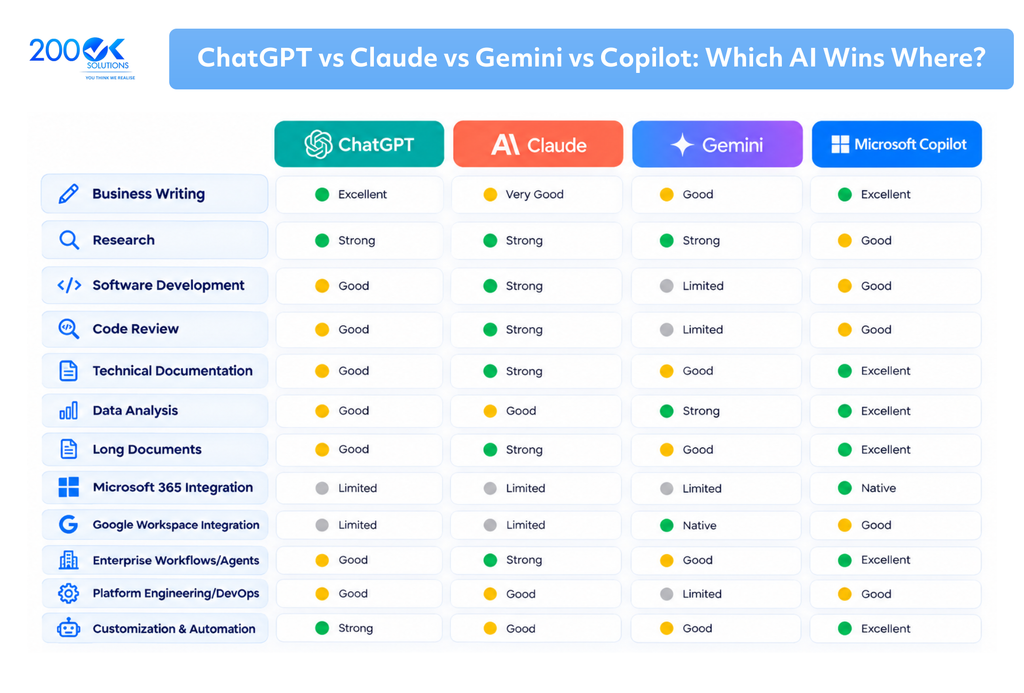
ChatGPT and Claude are both commonly used for coding support, code review and working through larger codebases. Claude is often chosen for reviewing bigger, more complex changes. Teams on Microsoft developer tools may prefer GitHub Copilot inside Visual Studio and Azure DevOps. For work across different platforms, a general assistant is usually more flexible.
Best AI chatbot for business writing and reports
All four handle business writing well. The deciding factor is where you write. If reports live in Word, Copilot saves app switching. If you write in Google Docs, Gemini does the same. For longer, more structured documents such as board papers, policies and detailed proposals, test Claude’s handling of long content and consistent tone.
Best AI for document analysis and technical documentation
This is one of the clearer recommendations in this article. Claude is often chosen for it because it can hold and reason across long documents in one pass. If your documents already sit inside Microsoft or Google tools, test the built-in option first. The convenience may outweigh a small difference in reasoning.
Best AI chatbot for data analysis and research
For research across many sources, ChatGPT’s research features and Claude’s document reasoning are both strong. For data analysis, the best tool is often the one already inside your spreadsheet or data platform. That means Gemini with Sheets and BigQuery, or Copilot with Excel.
Best AI chatbot for customer support automation
This is not a single-chatbot choice. It depends on your CRM, your help desk and your existing automation. ChatGPT and Claude are often used as the engine inside a purpose-built support system, connected through an API. They are not used directly as a chat window. Check data privacy rules that apply to your customers, such as GDPR in the UK and EU. If your support stack already runs on Microsoft or Google, test their built-in tools first.
Which AI is best for small business?
Small teams have less time for setup and fewer people to manage tools. For most, the practical choices are:
- Already on Microsoft 365 or Google Workspace: start with Copilot or Gemini, because they need the least setup.
- No strong ecosystem: start with ChatGPT or Claude and use the business plan, not a personal account, so you get admin controls and clearer data terms.
Whatever you pick, agree simple rules for staff before rolling it out (see the FAQ on data privacy below). If you are looking at AI tools for small business more broadly, start with one tool and one use case, then expand.
How to Choose an Enterprise AI Chatbot
The Real Question Is Not Which AI Chatbot Is Best
Most businesses end up using more than one AI tool:
- Microsoft Copilot for daily Microsoft 365 work.
- Claude or ChatGPT, often through an API, inside internal tools for engineering, research or document-heavy work.
- Gemini for teams on Google Workspace.
- Custom AI systems for tasks unique to the business, such as customer support, private data analysis or compliance checks.
The more useful question is how you connect these tools into your daily work. Without a plan, you get four separate pilots that never scale. That is a workflow design and AI governance problem, not a chatbot choice problem.
Conclusion
There is no universal best AI chatbot for business. ChatGPT, Claude, Gemini and Microsoft Copilot each do different things well. The right choice, or mix of tools, depends on:
- Your current software.
- Your team’s daily workflows.
- Your data and security requirements.
- Your integration needs.
- The business results you want.
The businesses getting the most from AI aren’t the ones that picked the “best” chatbot. They are the ones that worked out where each tool fits and built the workflows and rules to support it.
FAQ
1. Which is the best AI chatbot for business?
A. No single chatbot is best for every business. It depends on your software and use case. Microsoft 365 teams often get the most from Copilot. Google Workspace teams often prefer Gemini. Teams wanting a flexible standalone assistant usually test ChatGPT or Claude, and often pick Claude for long, technical or document-heavy work.
2. Is Claude better than ChatGPT for business?
A. Neither wins in every case. ChatGPT offers more range and a bigger third-party ecosystem. Claude is often chosen for long documents, technical documentation and structured analysis. Test both on your own tasks.
3. Which AI chatbot is best for software development?
A. ChatGPT and Claude are both widely used for coding. Teams often prefer Claude for reviewing larger, more complex changes. If you use Microsoft developer tools, GitHub Copilot may be more convenient day to day.
4. Is Microsoft Copilot better than ChatGPT for business teams?
A. It depends on where the work happens. Copilot is built into Word, Excel, Outlook and Teams and uses your organization’s own content. ChatGPT is a flexible, general assistant not tied to one suite. Many companies use both.
5. Is ChatGPT GDPR compliant, and is it safe for business data?
A. That depends on the plan and how you set it up, not just the tool. Business and enterprise plans usually come with more admin controls and clearer data terms than personal accounts. Read the vendor’s current data processing terms, and ask your legal or IT team before staff enter customer data.
6. Can businesses use multiple AI chatbots together?
A. Yes, and many do. Teams commonly use Copilot or Gemini for daily work inside their ecosystem, and Claude or ChatGPT for engineering, research or document-heavy work, often connected to internal tools through an API. This needs clear workflow design and governance, or AI use across the business becomes scattered and ungoverned.
You may also like : Beyond Chatbots: AI Agents and the Future of Retail Automotive