
Short answer: Before buying Cursor, GitHub Copilot, or any AI coding assistant, confirm five things, your codebase is ready for AI-generated changes, your security and IP policies cover AI tools, your team has a rollout plan, you understand the usage-based pricing model, and you have a way to measure ROI. Skipping this checklist is why most AI tool rollouts stall within 90 days.
Every week, thousands of people search for “copilot ai,” “copilot agents,” “cursor ide pricing,” and “which companies offer AI copilots for coding.” The demand is real. So is the confusion. Search data shows people jumping straight to sign-up and pricing questions, “where can I sign up for a free trial,” “what are the subscription costs”, without asking whether their organization is actually ready to use these tools well.
That’s the gap this checklist closes.
Why Businesses Buy AI Coding Tools Before They’re Ready
The rise of AI copilots and AI-native IDEs like Cursor has created a rare kind of buying pressure: fear of falling behind. Search trends around “copilot agents,” “copilot agent builder,” and “AI coding assistant integration” show that interest has shifted from “does this work” to “how do I deploy this across my team.”
That shift is the problem. Tool adoption is outpacing process readiness. Teams install an AI copilot, use it for a few weeks, and then hit one of three walls:
- Code quality drops because AI-generated code isn’t being reviewed with the same rigor as human-written code.
- Security teams flag that proprietary code is being sent to third-party model providers without a clear policy.
- Leadership can’t tell whether the tool paid for itself, because nobody defined what “success” looked like before rollout.
None of these are tool problems. They’re integration problems. And integration problems are solved before purchase, not after.
Cursor vs. Copilot: What You’re Actually Choosing Between
Before the checklist, it helps to be precise about what each tool is, because they solve different problems.
GitHub Copilot is an AI pair-programmer that plugs into your existing editor, VS Code, JetBrains, Neovim, Visual Studio. It layers AI suggestions, chat, and agent features on top of a tool your developers already use.
Cursor is a full AI-native code editor, built as a fork of VS Code. Instead of adding AI to your editor, it replaces the editor itself with one built around AI-first workflows, multi-file editing, codebase-wide context, and background agents.
That distinction matters more than pricing. Copilot is a lower-friction add-on; Cursor asks your team to change tools.
| Factor | GitHub Copilot | Cursor |
| Form factor | Extension inside your existing editor | Standalone AI-native editor (VS Code fork) |
| Entry price (individual) | Free tier available; paid plans start around $10/month | Free tier available; paid plans start around $20/month |
| Team plans | Per-seat pricing with centralized admin controls | Per-seat pricing with centralized admin controls |
| Billing model | Usage-based credits, metered by token consumption | Usage-based credits, metered by model usage |
| Best fit | Teams that want AI added to a familiar workflow with minimal disruption | Teams doing heavy agentic, multi-file, or greenfield AI-assisted development |
| Migration effort | Low, install and go | Higher, editor switch, settings, extension parity |
Both tools have moved to usage-based, credit-metered billing rather than flat unlimited access. That single fact should change how you budget: sticker price is not your real cost. Your real cost is how your team actually uses the tool, model by model, request by request.
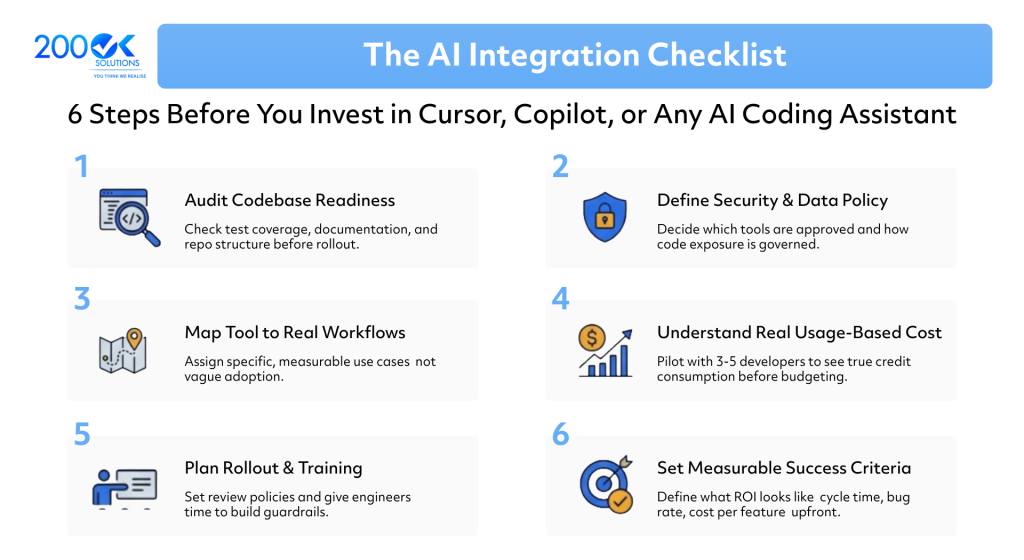
The AI Integration Checklist
Use this before you sign a contract, not after.
1. Audit your codebase and workflows for AI-readiness
AI copilots perform best in codebases with consistent structure, documented conventions, and reasonable test coverage. Before buying, ask:
- Do we have automated tests that would catch a bad AI-generated change?
- Is our codebase documentation current enough for an AI tool to understand context?
- Do we have a monorepo or fragmented repos, and does the tool handle that structure well?
If the answer is “not really,” fix that first. An AI copilot amplifies whatever discipline already exists in your engineering process, good or bad.
2. Define your security and data governance policy
This is the item most companies skip, and the one that causes the most damage later. Decide, in writing, before rollout:
- Which AI tools are approved for use on proprietary or client code
- Whether the vendor trains models on your code, and how to disable that
- What happens to code sent to third-party model providers (Cursor and Copilot both route requests through underlying LLM providers)
- Whether your compliance obligations (SOC 2, HIPAA, client contracts) restrict AI tool use
Both tools offer privacy or “no training on your code” modes at the business tier. Free and individual tiers often don’t guarantee the same protections. Don’t assume, check the current terms before enabling a tool org-wide.
3. Map the tool to a real workflow, not a general use case
“We’re adopting an AI copilot” is not a plan. “Our backend team will use it for boilerplate generation and test writing, reviewed under the existing PR process” is a plan. Search intent data shows people asking “how can a copilot tool improve productivity in software engineering”, the honest answer is: only if it’s mapped to specific, measurable tasks. Vague adoption produces vague results.
4. Understand the real cost, not the sticker price
Both Cursor and Copilot now bill on usage-based credit systems tied to actual model consumption. This means:
- Heavy agent use, large refactors, and premium/frontier models burn through credits faster than simple autocomplete
- A team that estimates cost off the base subscription price alone will likely underbudget
- Overage costs can accumulate quickly on teams doing agentic, multi-file work
Before committing budget, run a paid pilot with 3-5 developers for two to four weeks. Track actual credit consumption. Extrapolate from real usage, not marketing numbers.
5. Plan the rollout and training, not just the purchase
Buying licenses is the easy part. Adoption fails when:
- Developers aren’t trained on how to prompt, review, and correct AI output
- There’s no policy on when a human must review AI-generated code before merge
- Senior engineers aren’t given time to establish team-wide patterns and guardrails
A rollout plan should include a pilot phase, a review process for AI-assisted commits, and a designated owner responsible for monitoring adoption and cost.
6. Set measurable success criteria before you start
Decide upfront what you’re measuring: cycle time, PR throughput, bug rate on AI-assisted code, developer satisfaction, or cost per feature shipped. If you don’t define this before rollout, you won’t be able to answer the question every finance team eventually asks: “Was this worth it?”
Frequently Asked Questions
Q. Is Cursor better than GitHub Copilot?
Neither is universally better. Copilot fits teams that want AI layered into an existing editor with minimal workflow disruption. Cursor fits teams ready to adopt an AI-native editor and lean into agentic, multi-file workflows. The right choice depends on your team’s current tools, not on feature lists alone.
Q. How much does an AI coding assistant actually cost for a team?
Both tools now use usage-based credit billing on top of a base subscription. Real cost depends on how much your team uses premium models and agent features, not just the listed per-seat price. Always pilot before estimating team-wide budget.
Q. Do I need a policy before rolling out an AI copilot?
Yes. At minimum, you need a data governance policy covering what code can be exposed to AI tools, and a code review policy covering how AI-generated code gets validated before merge.
Q. Can AI copilots replace developers?
No. They accelerate specific tasks, boilerplate, test generation, refactoring, first-draft code, but still require human review, architectural judgment, and context these tools don’t reliably have.
Where This Fits Into a Bigger Picture
Buying an AI copilot is a small decision. Deciding how AI fits into your engineering process, your data governance, and your operating model is a bigger one, and it’s where most companies actually struggle.
At 200ok solutions, our focus is intelligent business transformation, helping organizations integrate AI into their workflows in a way that’s governed, measurable, and actually adopted, not just purchased. If you’re weighing Cursor, Copilot, or a broader AI tooling strategy, we help you build the checklist into a real rollout plan, not just a subscription.