
If you’re researching “AI-augmented engineering teams,” you’re probably trying to answer one question: do I buy a tool, or do I hire a team that already knows how to use one? Most content online answers this by listing AI coding tools. That’s the wrong starting point.
The tools themselves aren’t the differentiator anymore, most serious engineering teams have access to roughly the same set of AI coding assistants, testing tools, and collaboration platforms. What separates a team that ships reliable software faster from one that ships more bugs faster is discipline: review processes, security scanning, and clear rules for what AI can and can’t touch unsupervised. That’s the part nobody’s writing about, so that’s where this post is going to focus. Here’s the actual breakdown.
What Is an AI-Augmented Engineering Team?
An AI-augmented engineering team is a group of software engineers who use AI tools, code generation, automated testing, debugging assistants, as a built-in part of how they work, not as an occasional add-on. The output isn’t “engineers who also use AI.” It’s a team you build so AI handles repetitive work (boilerplate code, test coverage, bug triage) while engineers focus on architecture, judgment calls, and product decisions.
This matters because of where the industry is heading: Gartner projects that by 2030, 80% of organizations will shift from large traditional engineering teams to smaller, AI-augmented ones. Deloitte’s 2026 analysis estimates AI can drive 30–35% productivity gains across the software development lifecycle when teams integrate it properly, not bolt it on as an afterthought.
What Are the Key Advantages of AI-Augmented Engineering Teams?
- Faster delivery cycles. AI compresses routine coding and test-writing from days to hours, freeing engineers for higher-value work.
- Lower cost per feature shipped, not necessarily lower headcount cost, the gain comes from throughput, not cheaper labor.
- Better test coverage and fewer regressions, since AI-assisted testing tools catch issues human review often misses under deadline pressure.
- Smaller teams can do more, which matters if you’re a startup or scale-up that can’t justify a 15-person engineering org yet.
The advantage disappears if the team hasn’t learned to use these tools with discipline. Engineers still need to review AI-generated code, a human still needs to own architecture decisions, and someone still needs to enforce security scanning, otherwise you’re trading development speed for technical debt and security risk. Any vendor who tells you otherwise is selling you something.
Where AI-Augmented Teams Actually Go Wrong
Before you build or hire one, it’s worth knowing where this model breaks down, because it does, often quietly, before anyone notices.
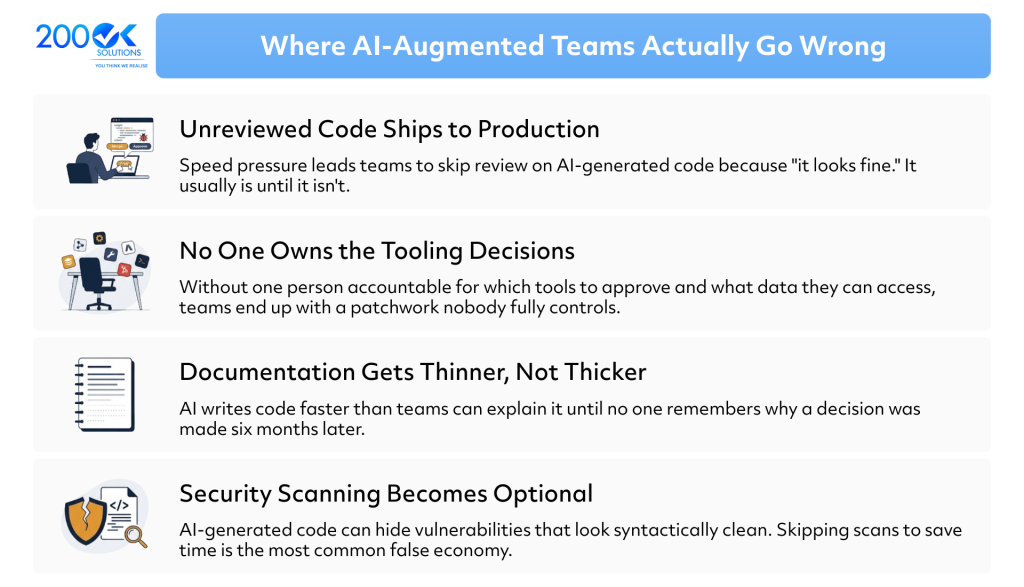
None of these are reasons to avoid AI-augmented teams. They’re reasons to be specific about what “AI-augmented” actually requires operationally, which is exactly what separates a well-run team from a fast-but-fragile one.
What AI Tools Do These Teams Actually Use?
Most AI-augmented teams combine tools across three categories:
- Code generation and debugging : assistants that write and review code inline as engineers work.
- Automated testing : tools that generate test cases and flag regressions before code ships.
- Collaboration and documentation : AI-assisted tools that keep distributed teams aligned on decisions and context, which matters even more when the team spans time zones.
We’re deliberately not naming specific platforms here, that list changes every few months, and a tool comparison isn’t the point. The point is that the team, how you structure, train, and manage it, determines whether these tools actually produce good software, or just more of it.
How Much Do AI-Augmented Engineering Teams Cost?
Pricing works differently than either a SaaS tool subscription or traditional staff augmentation:
- Tool-only cost (buying AI coding/testing licenses yourself): typically $20–$50 per developer per month, per tool. This is the cheapest option on paper, but it assumes your existing team already knows how to use these tools well, which many don’t yet.
- AI-augmented staff augmentation: this costs about the same as standard dedicated development team rates, but delivery output is higher per engineer because AI tooling is already part of their workflow. You’re not paying extra for the AI, you’re paying for a team that’s already fluent with it.
- Consulting/implementation engagement: a fixed or time-boxed engagement to help your existing team adopt AI tooling properly, governance, code review standards, security scanning setup. This is usually the right starting point if you have an in-house team already, but no AI workflow discipline yet.
Rates are fairly stable across 2026, what changes the total cost is team maturity and governance, not the AI tools themselves.
One thing worth being direct about: hidden cost usually shows up later, not upfront. A cheap tool-only setup looks attractive on a spreadsheet, but if your existing engineers haven’t learned to review AI output properly, you pay for it in production incidents and rework six months down the line. Factor that into the comparison, not just the monthly rate.
How to Structure an AI-Augmented Team Properly
If you decide this is the right model, the structure matters more than the tool stack. A few practices separate teams that get this right from teams that don’t:
- Assign a technical owner for AI governance, someone accountable for which tools to approve, how to configure them, and what data they can touch. This shouldn’t be a committee decision; it should be one person’s job.
- Keep code review mandatory, not optional, regardless of how confident the AI output looks. Treat AI-generated code the same way you’d treat a junior engineer’s pull request, useful, often good, but don’t trust it automatically.
- Bake documentation into the workflow, not as an afterthought. If AI is writing code faster than humans can explain it, documentation debt compounds quickly.
- Run automated security scanning on every commit, not periodically. This is non-negotiable if AI is generating a meaningful share of your codebase.
- Treat the team as one unit, not tools plus headcount. The teams that get the productivity gains Deloitte and Gartner describe are the ones that run engineers and AI tooling as a single workflow, not engineers using AI on the side when convenient.
This is also where the build-vs-hire decision gets clearer. Building this discipline in-house from scratch takes time most companies don’t have spare bandwidth for. That’s usually the real reason companies look at a consulting engagement or an AI-augmented dedicated team instead of doing it alone not because they can’t eventually get there, but because getting there while also shipping a product roadmap is a lot to ask of a team that’s already stretched.
Build In-House, Buy a Tool, or Hire a Partner?
| Situation | Best fit |
| You have an in-house team but no AI workflow discipline | Consulting engagement to set up governance and process |
| You need to scale delivery fast without growing headcount | AI-augmented staff augmentation / dedicated team |
| You just need individual developer productivity tools | Buy licenses directly, you don’t need a partner for this |
If you’re a founder or CTO past the “just buy a tool” stage, meaning you need a team that ships production software reliably, not just code faster, that’s a staff augmentation or dedicated team conversation, not a tool-shopping one.
FAQ
Q. What’s the difference between an AI tool and an AI-augmented engineering team?
An AI tool is software you buy and hand to your existing engineers. An AI-augmented team is a group of engineers who already know how to use those tools effectively, backed by a review and governance layer that stops AI-generated code from creating technical debt.
Q. Are AI-augmented teams cheaper than traditional engineering teams?
Not necessarily cheaper per engineer, but they typically ship more per engineer, which lowers cost per feature delivered.
Q. Do I still need code review if my team uses AI tools?
Yes. AI-generated code still requires human review for security, architecture fit, and long-term maintainability. Skipping this step is the most common reason AI-augmented teams underperform.
Q. How do I know if my company is ready for an AI-augmented team?
If you have clear technical ownership, existing documentation practices, and a defined product roadmap, you’re ready. If those aren’t in place yet, fix that first, AI tooling amplifies whatever process you already have, good or bad.
Q. Can a distributed or global engineering team also be AI-augmented?
Yes, and in practice it’s often a natural pairing. Distributed teams already rely on strong documentation and asynchronous workflows to stay aligned across time zones, the same discipline that makes AI-augmented workflows safe to run at speed. The teams that struggle with one usually struggle with the other, since both depend on the same underlying process maturity.
The Bottom Line
The “tool vs. team” question isn’t really about which AI product is best, it’s about whether you have the process maturity to use AI safely at speed, or whether you need a partner who already does. If your in-house team has clear ownership, solid documentation habits, and room to build that discipline internally, a tool-only approach can work. If you need to scale delivery now, without spending the next two quarters building AI governance from scratch, an AI-augmented dedicated team or a short consulting engagement to set up that foundation is usually the faster, lower-risk path.
You may also like : Context Engineering vs Prompt Engineering: What’s the Real Difference