
Every founder building an AI product eventually hears the same advice: “You’ll need Kubernetes.” Sometimes it comes from an engineer who has used it for years. Sometimes it comes from a cloud vendor. And with Google Cloud now positioning Google Kubernetes Engine (GKE) as a platform built for AI workloads, the pressure to adopt it has only grown.
But here is the honest answer: most early-stage AI products do not need Kubernetes on day one. Some will need it later. A few need it right now. The expensive mistake is not choosing the wrong tool. It is choosing a complex one too early, or waiting too long to move off a simple one that has stopped scaling.
This guide helps you decide. We will cover what Kubernetes actually does for AI products, when it pays off, when it does not, what simpler options exist, and a checklist you can use with your team this week.
What Kubernetes actually does for an AI product
Kubernetes is an open-source system that runs and manages containers across a group of machines. It decides where each workload runs, restarts it if it fails, and scales it up or down with demand.
For a standard web app, that is useful. For an AI product, it can matter much more, because AI workloads are heavier and less predictable than ordinary software:
- They need expensive hardware. Model training and inference often depend on GPUs or TPUs, which are costly and in limited supply.
- They start slowly. Large models can take minutes to load before they can answer a single request.
- Demand is spiky. A product launch or a viral post can multiply your traffic in an hour.
- They have many moving parts. Data pipelines, training jobs, model serving, and monitoring all need to work together.
Kubernetes gives you one consistent layer to schedule all of this. That is why it has become the common foundation for MLOps, the practice of taking machine learning models from experiment to reliable production service.
Why Kubernetes and AI are suddenly in the headlines
Cloud providers are now building AI-specific features directly into their Kubernetes platforms. Google’s recent GKE announcements are a good example of where the industry is heading:
- Agent Sandbox is a Kubernetes building block that isolates AI agent workloads at the kernel level, so an agent that behaves unpredictably cannot affect the rest of your system. It is built on gVisor, Google’s open-source sandbox technology.
- Pod Snapshots lets you checkpoint and restore running workloads, reducing start times from minutes to seconds for both CPU and GPU workloads.
- GKE Inference Gateway is aimed at serving AI models more efficiently. Coverage of the launch reported lower time-to-first-token latency and reduced token costs.
- Larger clusters. Google also announced support for clusters of up to 130,000 nodes, though that scale is relevant mainly to organizations training very large models.
The takeaway for a startup is not “adopt all of this.” It is that the tooling for running AI on Kubernetes is maturing quickly, which lowers the cost of adopting it later when you genuinely need it.
When Kubernetes is the right choice
Kubernetes starts to pay for itself when several of these are true:
1. You run your own models, not just API calls
If your product calls a hosted model through an API, the provider handles the GPUs. Kubernetes matters when you host open-source or fine-tuned models yourself, because then you own the scheduling, scaling and cost of that hardware.
2. Your GPU bill is large enough to optimize
GPUs are the most expensive line item in many AI products. Kubernetes lets you pool GPUs across teams and workloads, scale GPU nodes down when traffic is low, and in many setups share a single GPU between smaller workloads. If you are spending a meaningful amount every month, this efficiency can justify the complexity. If your GPU spend is small, it probably cannot.
3. You need to run many different workloads together
Training jobs, batch processing, real-time inference, and background agents all behave differently. Kubernetes can run them side by side on the same infrastructure with clear priorities.
4. You are running AI agents that take actions
Agents that browse, run code, or call external systems introduce real security risk. Isolation features such as sandboxing exist precisely for this, and Kubernetes is where that tooling is being built.
5. You need portability or have compliance requirements
If customers require you to run in their cloud, in a specific region, or on-premises, Kubernetes gives you a common deployment layer across environments.
6. You already have people who know it
This one is underrated. A team that has operated Kubernetes before will move faster on it than on any “simpler” alternative they have never used.
When you probably do not need Kubernetes yet
For many startups, Kubernetes adds cost and complexity without adding value. You can likely wait if:
- You are still validating the idea. Speed of learning matters more than infrastructure efficiency. Ship on the simplest thing that works.
- You rely on third-party model APIs. There are no GPUs for you to manage.
- Your traffic is low or predictable. A single service on a managed platform will cope easily.
- You have no one to run it. Kubernetes is not set-and-forget. Upgrades, networking, security, and cost control need ongoing attention. A small team can easily lose weeks to cluster issues instead of building product.
A common pattern is the “resume-driven architecture” trap: choosing a heavy platform because it looks impressive to investors or engineers, not because the product needs it.
Simpler alternatives to consider first
Before committing to Kubernetes, look at what managed services can do for you:
| Option | Best for | Trade-off |
| Hosted model APIs | Products built on commercial models | Less control over cost, latency and data handling at scale |
| Serverless containers (for example, Google Cloud Run) | Web backends and lightweight inference with variable traffic | Fewer controls for complex, multi-service GPU workloads |
| Managed ML platforms (for example, Vertex AI, AWS SageMaker) | Training and deploying models without managing servers | Platform lock-in and per-use pricing |
| A single GPU VM | Early self-hosted model experiments | Manual scaling and no automatic recovery |
| Managed Kubernetes (GKE, EKS, AKS) | Growing products that have outgrown the above | Still requires Kubernetes skills, even if the control plane is managed |
Notice that managed Kubernetes is the last row. For most startups, it is a step you take after simpler options stop fitting, not before.
A quick decision checklist
Answer these questions honestly with your team. The more you answer “yes,” the stronger the case for Kubernetes.
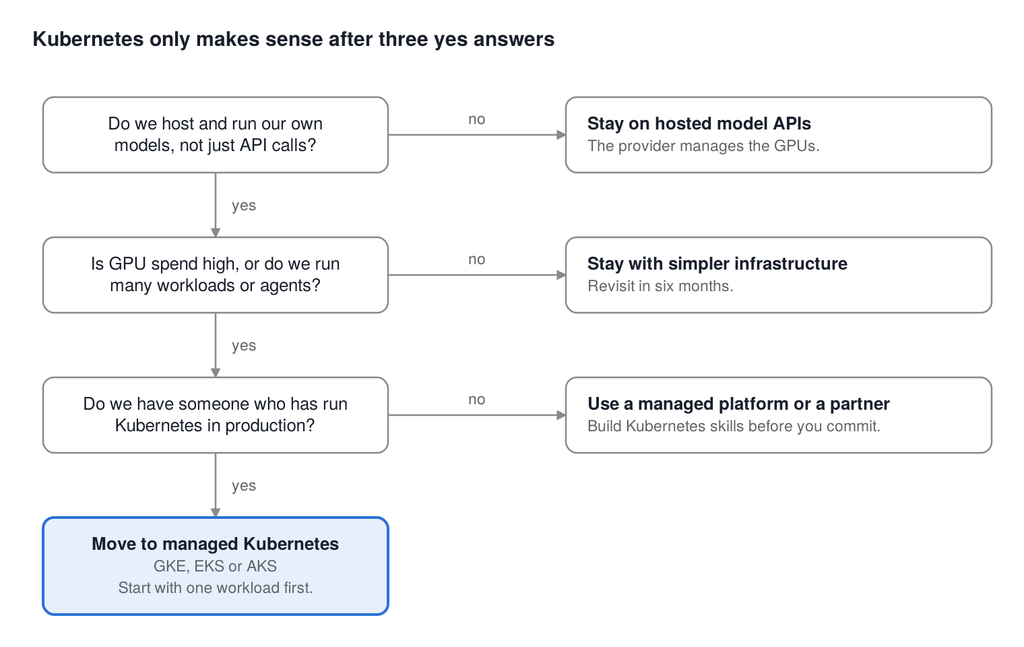
- Do we host and run our own models rather than only calling an API?
- Is our monthly GPU or compute bill high enough that a 20 to 30 percent saving would matter?
- Do we run more than a handful of different services or workloads that must scale independently?
- Do customers or regulators require us to deploy across multiple clouds, regions, or on-premises?
- Do we run AI agents that execute code or take actions, and do we need strong isolation?
- Do we have at least one engineer who has operated Kubernetes in production?
- Have we outgrown our current setup (slow deployments, scaling failures, or rising costs)?
How to read your score:
- 0 to 2 yes answers: Stay with simpler infrastructure. Revisit in six months.
- 3 to 4 yes answers: Plan a gradual move. Containerize your services now so migration is easy later.
- 5 or more yes answers: Kubernetes is likely worth it. Invest in doing it properly.
Read it top to bottom: any no sends you to a simpler option, and three yes answers lead to managed Kubernetes.
What a sensible adoption path looks like
You do not have to choose between “no Kubernetes” and “all-in on day one.” A staged approach lowers risk:
- Containerize first : Package your services with Docker. This helps on any platform and makes later migration far easier.
- Automate deployment : Set up CI/CD so releases are repeatable, whatever you run on.
- Start with managed Kubernetes : Use GKE, EKS or AKS so the cloud provider runs the control plane. Do not build your own cluster.
- Begin with one workload : Move a single inference service, learn from it, then expand.
- Add GPU optimization after you have data : Measure utilization before you invest in advanced scheduling or sharing.
- Put cost monitoring in from the start : GPU spend can grow quietly. Set budgets and alerts early.
- Introduce agent isolation when agents go live : If you ship autonomous agents, treat sandboxing as a requirement, not an extra.
Common mistakes to avoid
- Adopting Kubernetes before you have product-market fit : Infrastructure will not fix a product nobody wants.
- Underestimating operational work : Budget time for upgrades, security patches, networking, and on-call responsibility.
- Leaving GPUs idle : Expensive hardware sitting unused is the most common source of wasted AI spend.
- Ignoring security for agents : Giving an agent broad access without isolation is a serious risk.
- Skipping observability : If you cannot see latency, error rates, and cost per request, you cannot improve them.
- Building everything in-house : Managed services exist so a small team can focus on the product.
How 200OK Solutions can help
Choosing infrastructure is rarely a purely technical decision. It depends on your product stage, budget, team, and growth plans. At 200OK Solutions, we build bespoke software and help businesses turn their ideas into reliable, scalable products, including AI-powered applications.
We can help you:
- Assess your current setup and tell you honestly whether Kubernetes makes sense now or later
- Design cloud-native architecture that grows with your product
- Containerize and migrate existing applications with minimal disruption
- Build and deploy AI features such as intelligent automation and agent-based workflows
- Control cloud and GPU costs with the right monitoring from day one
If you are weighing infrastructure choices for an AI product, we are happy to talk it through with no obligation. Contact 200OK Solutions to book a conversation about your project.
Frequently asked questions
Q. Is Kubernetes necessary for MLOps?
A. No. MLOps is a practice, and it can be done on managed ML platforms, serverless services or simple pipelines. Kubernetes is a popular foundation once your workloads and team are large enough to benefit from it.
Q. Do I need Kubernetes to use GPUs for AI?
A. No. You can run GPUs on a single virtual machine, on a managed ML platform, or on serverless options that support GPUs. Kubernetes becomes valuable when you need to schedule and share GPUs across several workloads efficiently.
Q. What is the best AI infrastructure for a startup?
A. The best choice is the simplest one that meets your current needs. For many startups, that means hosted model APIs or a managed platform first, with a planned path to managed Kubernetes if and when scale demands it.
Q. Is managed Kubernetes (such as GKE) easier than running my own cluster?
A. Yes, considerably. With managed Kubernetes, the provider operates the control plane, so your team can focus on your workloads. You still need Kubernetes knowledge for deployments, scaling, and security.
Q. When should a startup move to Kubernetes?
A. Typically when you run your own models at meaningful scale, manage multiple workloads, have significant GPU spend, or face multi-cloud and compliance requirements, and when you have the skills to operate it.
Final thoughts
Kubernetes is a powerful platform for AI, and the tooling around it is improving fast. But power is not the same as fit. The best infrastructure choice for your startup is the one that lets you ship, learn, and scale without drowning your small team in operations.
Start simple. Containerize early. Measure your costs. And move to Kubernetes when your product, your budget and your team are ready for it, not because it is fashionable.
Planning an AI product and unsure what infrastructure it needs? Talk to the 200OK Solutions team for a practical, honest recommendation.