

Next.js, a popular React framework for building web applications, has undergone significant development since its Next.js is still the default choice for React teams building production web apps. But the framework has moved fast, two major versions since 2024 and a lot of content still points people toward outdated advice. Here’s where things actually stand as of August 2026, and what to check before you touch your package.json.
Next.js 14 is end of life. Next.js 15 support ends October 2026. Next.js 16.3 is the current stable release. If you’re planning an upgrade, the window to do it calmly, instead of under pressure when 15 stops getting security patches, is closing.

Key features and uses of Next.js
Server-side rendering
Server-side rendering (SSR) still means the server builds the full HTML page before sending it to the browser, rather than shipping a blank page and letting JavaScript fill it in client-side. What’s changed in Next.js 16 is how explicit the caching around this has become.
In Next.js 15, a fetch() call inside a Server Component was cached automatically, on a schedule you might not have consciously set. In Next.js 16, caching is explicit, nothing is cached unless you tell it to be. This is safer and more predictable, but it’s also a real migration risk: any code that quietly relied on Next.js caching things for you will now hit your backend on every request unless you add caching back in deliberately. Audit this before you deploy, not after.
Components are still server components by default. You opt into client-side interactivity with 'use client' at the top of the file, that part hasn’t changed.
Static site generation
Static Site Generation (SSG) still works the same way conceptually: Next.js pre-renders pages to static HTML at build time instead of on every request, which is faster and cheaper to serve.
What’s new is build performance. Teams migrating from 15 to 16 are seeing build times roughly 4x faster, along with meaningfully lower memory usage during the build, a fix aimed directly at the “FATAL ERROR” out-of-memory crashes that used to plague large codebases mid-build. If your CI pipeline has ever choked on a large Next.js build, this is the version where that gets meaningfully better.
Routing
This is where most of the actual migration work lives, so pay attention here more than anywhere else in this post.
The single biggest breaking change in Next.js 16: params, searchParams, cookies(), headers(), and draftMode() now return promises instead of direct values. Code that worked in Next.js 15 like this:
export default function Page({ params, searchParams }) {
  const slug = params.slug;
  const query = searchParams.q;
  const cookieStore = cookies();
}
now has to look like this:
export default async function Page({ params, searchParams }) {
  const { slug } = await params;
  const { q } = await searchParams;
  const cookieStore = await cookies();
}
Every route that reads dynamic URL data needs this update. It’s mechanical, but it’s spread across your entire codebase, which is why most teams budget 4–8 hours for a straightforward app and closer to a multi-week phased plan for large, middleware-heavy applications.
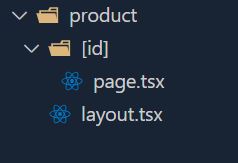
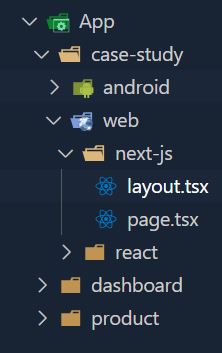
Dynamic routing (blog slugs, product IDs pulled from an API) and nested routing (app/case-study/web/next-js/page.tsx producing /case-study/web/next-js) work the same way structurally as before, the folder-based model hasn’t changed, only how you read the data once you’re inside it.
One more routing change worth knowing: middleware.js is deprecated in favor of proxy.js. The edge runtime is no longer supported inside proxy, it runs on Node.js only. If your app leans on low-latency edge middleware for things like CDN-level A/B testing, benchmark your latency after this migration; it’s the one place teams have reported real trade-offs.
Nested routing is utilised when you wish to nest routes, such as in the URL www.site.com/case-study/web/next-js. In this case, you can create a folder structure like App > case-study > web > next-js > page.tsx.
File structure
The file-based structure is unchanged and still the cleanest part of the framework:
page.tsx: the route’s main contentlayout.tsx: shared UI wrapping a page or sectionloading.tsx: a Suspense-based loading stateerror.tsx: error boundary for that route
If you’re upgrading an older app, these files don’t need structural changes, the work is inside them (async params, explicit caching), not around them.
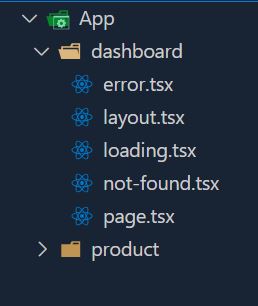
There are other route files but these are the main ones which are used in most of the folders.
SEO
The Metadata API works the same way it always has, config-based or file-based metadata, OG tags, Twitter cards, robots.txt, metadata templates to avoid repeating yourself:
import type { Metadata } from 'next';
export const metadata: Metadata = {
  title: 'About Us',
  description: 'What we do and why it matters.',
};
export default function AboutPage() {
  // page content
}
What’s actually changed for SEO isn’t the API, it’s the stakes. Google ranks on Core Web Vitals (CLS, LCP, INP), and Next.js 16’s caching and bundling changes directly affect those numbers. An app that isn’t caching correctly after the 15-to-16 migration won’t just be slower for users, it’ll be slower in a way Google measures and penalizes. SEO and the routing/caching migration above aren’t separate concerns anymore; get the caching wrong and your SEO gains from better performance evaporate.
Should you upgrade now?
- New projects: start on Next.js 16. There’s no reason to build new on a version that’s already trailing.
- Existing Next.js 15 apps: upgrade on a deliberate timeline before October 2026, not as an emergency after support ends. Budget time for the async params change and a caching audit.
- Existing Next.js 14 apps: don’t jump straight to 16. Go 14 → 15 → 16. Two smaller, testable migrations are lower-risk than one large one that mixes the React 18-to-19 shift with async APIs and stricter caching all at once.
Next.js 16 is a real improvement, faster builds, lower memory usage, more predictable caching. But “upgrade” here means real engineering work, not a version bump. Plan it like a project, not a patch.
You may also like : AI Agent Statistics You Need to Know in 2026