If you’re dealing with more data than one server can comfortably handle, you’ve probably heard of sharding. It’s the technique MongoDB uses to spread a large database across multiple machines. This guide explains how MongoDB sharding works, how to choose a shard key, when to avoid sharding, and how to build a working sharded cluster on your own machine.
What Exactly is Sharding?
Managing huge amounts of data is a common challenge, and it’s one of the main reasons teams choose NoSQL databases like MongoDB. MongoDB sharding is how MongoDB handles very high data volumes and write rates by distributing data across multiple servers.
In simple terms, sharding splits a large dataset into smaller chunks and stores them on different MongoDB instances called shards. Each shard holds a different part of the data. When a single server holds everything, one machine’s CPU, memory, disk and network limit every query. Spreading the data lets MongoDB serve more requests at the same time.
Sharding is horizontal scaling (scale out). It is different from replication, which keeps copies of the same data on several servers for availability. Production sharded clusters use both: data is split across shards, and each shard is itself a replica set.
Why Do We Need Sharding?
When your data outgrows one server, you can scale up (vertical scaling: a bigger machine) or scale out (horizontal scaling: more machines). Every machine eventually hits a ceiling, and the biggest machines cost disproportionately more. Sharding lets you add ordinary servers instead.
Sharding also spreads read and write load, so no single server becomes the bottleneck. Because every shard is a replica set, each part of your data also stays available if one node fails.
When you should not shard yet
Sharding adds real operational cost: more servers to run, monitor and back up, plus a shard key decision that is hard to undo. Try these first:
- Fix indexes and queries. Use
explain()to find collection scans and add the right compound indexes. - Check your working set. If frequently used data and indexes fit in RAM, queries stay fast. Adding memory is often cheaper than sharding.
- Scale up. A larger instance buys time and keeps your architecture simple.
- Use replica sets for read scaling when your load is read-heavy and your data still fits on one machine.
- Archive old data. Moving cold data out of hot collections can remove the problem.
Consider sharding when your data no longer fits on one server’s disk or memory, when a single primary can’t keep up with write throughput, or when you need data placed in specific regions.
Sharded Cluster Architecture
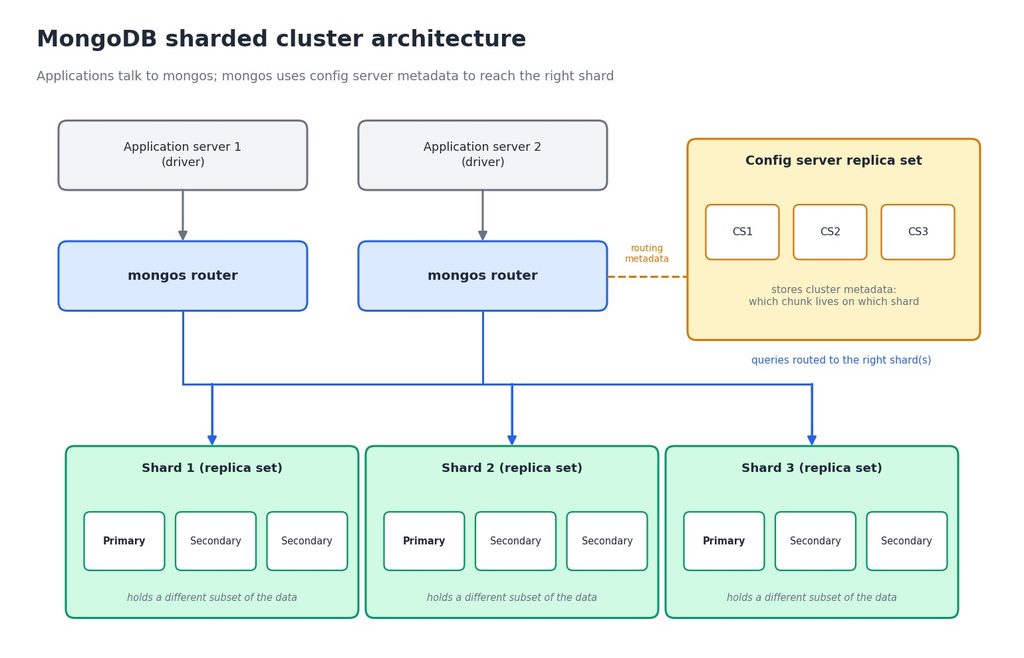
A sharded cluster in MongoDB has three main components:
- Shard: A replica set that holds part of the dataset. Each shard stores a different subset of the data, and its replica set members copy that subset for redundancy and failover.
- mongos: The query router. Your application connects to mongos, which looks up where the data lives and sends each query to the right shard or shards. Your application doesn’t need to know the cluster’s internal layout. In production, run more than one mongos so the router isn’t a single point of failure.
- Config server replica set: Stores the cluster’s metadata, such as which chunk of data lives on which shard. If the config servers are unhealthy, the cluster can’t make routing or balancing changes, so they run as a replica set too.
Targeted queries vs scatter-gather queries
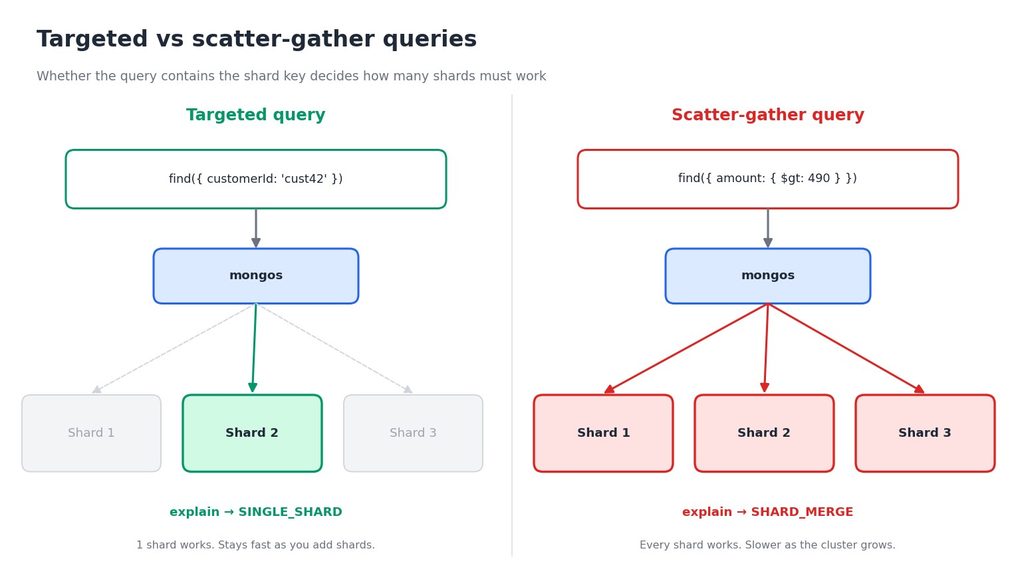
How mongos routes a query is the main reason shard key choice matters:
- A targeted query includes the shard key (or its leading field). mongos sends it to one shard, or a few, and it stays fast as the cluster grows.
- A scatter-gather query doesn’t include the shard key. mongos must ask every shard and merge the results, so it gets slower and costlier as you add shards.
You can see which one you’re getting with explain(). A targeted query reports SINGLE_SHARD, and a scatter-gather query reports SHARD_MERGE.
Benefits of MongoDB Sharding
1. Increased throughput: Reads and writes are spread across shards, so total throughput can grow as you add shards. This works best when your queries are targeted and your shard key spreads data evenly. If one shard handles 1,000 operations per second, three well-balanced shards can approach 3,000, but a poor shard key or scatter-gather queries will reduce that gain.
2. High availability: Each shard is a replica set. If a primary fails, a secondary is elected and that part of the data stays available. The other shards keep serving requests throughout.
3. Increased storage capacity: Total capacity grows as you add shards, so the dataset is no longer limited by one machine’s disk. MongoDB deployments handle very large datasets this way.
4. Better data locality: Zone sharding lets you place data on specific shards by location or business rule. For example, you can keep European customers’ data on shards in Europe for lower latency and data residency requirements.
Shard Key: The Heart of Data Distribution
MongoDB uses a shard key, a field (or fields) in every document, to decide which shard stores it. MongoDB divides the shard key’s values into chunks and distributes the chunks across shards. The shard key controls how evenly data is spread and whether your queries are targeted, so it is the most important decision in a sharded design.
What makes a good shard key
- High cardinality: many distinct values, so data can split into many chunks. A key with few values (like a country code) can’t spread beyond that number of chunks.
- Low frequency: no single value should dominate. If one customer owns 40% of your documents, their data lands in one oversized chunk.
- Non-monotonic: values that always increase, such as a timestamp or the default
ObjectId, send every new write to the last chunk, which creates a write hotspot on one shard. - Used by your common queries, so most queries are targeted.
| Shard key | Result |
|---|---|
{ _id: 1 } (range) | Hotspot: new ObjectId values always increase, so all inserts hit one shard |
{ _id: 'hashed' } | Even writes, but range queries become scatter-gather |
{ createdAt: 1 } | Hotspot on the newest chunk |
{ country: 1 } | Low cardinality: very few chunks, and some values are much larger than others |
{ customerId: 'hashed' } | Even distribution, and queries by customer are targeted |
{ tenantId: 1, _id: 1 } (compound) | Good targeting by tenant and good spread inside each tenant |
The user ID is a common example, but whether it’s a good key depends on the type. A hashed user ID spreads writes evenly. A plain increasing user ID with range sharding does not.
Can I change the shard key later?
Yes, with limits. In current MongoDB versions you can change a document’s shard key value, add a suffix to an existing key with refineCollectionShardKey, or fully change the key with reshardCollection. Resharding is a heavy operation on a large collection, so choose carefully upfront. Check the MongoDB documentation for the version you run.
Data Balancing Across Shards
Once data is split, MongoDB keeps it even. When a chunk grows past the maximum chunk size, MongoDB splits it. The balancer, a background process, then migrates chunks between shards so no shard becomes overloaded. In recent versions (6.0 and later), the balancer works from data size per shard rather than raw chunk counts, and the default chunk size is 128 MB.
The balancer runs automatically, but migrations use network and disk, so teams often restrict them to a quiet window on busy systems.
Jumbo chunks
A chunk that grows beyond the maximum size and can’t be split is a jumbo chunk. This happens when many documents share the same shard key value, which is why low-cardinality and high-frequency keys cause trouble. Jumbo chunks can’t be moved by the balancer, so one shard ends up with more data than the others.
Sharding Strategies
MongoDB offers three main ways to shard, depending on how your data is structured and queried:
- Range sharding: Documents are divided into contiguous ranges of shard key values. It suits queries that read ranges of data, but a monotonically increasing key creates hotspots.
- Hashed sharding: MongoDB hashes the shard key value and distributes documents by the hash. This spreads data and writes evenly, but range queries on the key must hit every shard.
- Zone sharding: You assign ranges of shard key values to named zones, and zones to shards. This controls where data lives, for example by region.
A zone example, assuming a shard key that starts with region:
sh.shardCollection('shop.orders', { region: 1, _id: 1 })
sh.addShardToZone('shard_repl', 'EU')
sh.updateZoneKeyRange(
  'shop.orders',
  { region: 'EU', _id: MinKey },
  { region: 'EU', _id: MaxKey },
  'EU'
)
Here is a step-by-step guide to deploying a self-managed sharded cluster in MongoDB. It runs everything on one machine for learning. Don’t use localhost and a single machine for production.
Before you start
Create a folder for each data directory, then run each mongod or mongos command in its own terminal. These commands work on Linux, macOS and Windows PowerShell:
mkdir -p data/config1 data/config2 data/config3
mkdir -p data/shard1a data/shard1b data/shard1c
mkdir -p data/shard2a data/shard2b data/shard2c
1. Create the config server replica set
Start three config server members:
mongod --configsvr --port 28041 --bind_ip localhost --replSet config_repl --dbpath data/config1
mongod --configsvr --port 28042 --bind_ip localhost --replSet config_repl --dbpath data/config2
mongod --configsvr --port 28043 --bind_ip localhost --replSet config_repl --dbpath data/config3
Connect to one member and initiate the replica set. Config server replica sets need configsvr: true:
mongosh --host localhost --port 28041

rs.initiate({
  _id: 'config_repl',
  configsvr: true,
  members: [
    { _id: 0, host: 'localhost:28041' },
    { _id: 1, host: 'localhost:28042' },
    { _id: 2, host: 'localhost:28043' }
  ]
})

rs.status()
2. Create the shard replica sets
Start Shard 1’s three members:
mongod --shardsvr --port 28081 --bind_ip localhost --replSet shard_repl --dbpath data/shard1a
mongod --shardsvr --port 28082 --bind_ip localhost --replSet shard_repl --dbpath data/shard1b
mongod --shardsvr --port 28083 --bind_ip localhost --replSet shard_repl --dbpath data/shard1c
Connect and initiate it:
mongosh --host localhost --port 28081

rs.initiate({
  _id: 'shard_repl',
  members: [
    { _id: 0, host: 'localhost:28081' },
    { _id: 1, host: 'localhost:28082' },
    { _id: 2, host: 'localhost:28083' }
  ]
})
Repeat for Shard 2:
mongod --shardsvr --port 29081 --bind_ip localhost --replSet shard2_repl --dbpath data/shard2a
mongod --shardsvr --port 29082 --bind_ip localhost --replSet shard2_repl --dbpath data/shard2b
mongod --shardsvr --port 29083 --bind_ip localhost --replSet shard2_repl --dbpath data/shard2c

mongosh --host localhost --port 29081

rs.initiate({
  _id: 'shard2_repl',
  members: [
    { _id: 0, host: 'localhost:29081' },
    { _id: 1, host: 'localhost:29082' },
    { _id: 2, host: 'localhost:29083' }
  ]
})
3. Start the mongos router
Point mongos at the config server replica set:
mongos --configdb config_repl/localhost:28041,localhost:28042,localhost:28043 --bind_ip localhost --port 270174. Connect to the cluster through mongos
mongosh --host localhost --port 270175. Add the shards
Add each shard once, listing all its members so mongos can find the replica set if one node is down:
sh.addShard('shard_repl/localhost:28081,localhost:28082,localhost:28083')
sh.addShard('shard2_repl/localhost:29081,localhost:29082,localhost:29083')
6. Enable sharding for a database
sh.enableSharding('shop')In MongoDB 6.0 and later this step is optional, because sharding a collection enables sharding on its database automatically. It’s still harmless and sets the database’s primary shard.
7. Shard a collection
We’ll use an orders collection and a hashed customerId shard key, which has high cardinality and spreads writes evenly:
sh.shardCollection('shop.orders', { customerId: 'hashed' })Now insert sample data through mongos:
use shop
const docs = []
for (let i = 0; i < 100000; i++) {
  docs.push({
    customerId: 'cust' + (i % 5000),
    amount: Math.round(Math.random() * 500),
    createdAt: new Date()
  })
}
db.orders.insertMany(docs)
To compare, you can shard a second collection with a range key. Use a compound key such as { customerId: 1, _id: 1 }. A key on a field with few values (such as a country code) shows how one value’s data can’t spread across shards.
8. Check distribution and routing
See how documents spread across the shards:
db.orders.getShardDistribution()
sh.balancerCollectionStatus('shop.orders')
Then compare a targeted and a scatter-gather query:
// Includes the shard key: targeted
db.orders.find({ customerId: 'cust42' }).explain().queryPlanner.winningPlan.stage

// Doesn’t include the shard key: scatter-gather
db.orders.find({ amount: { $gt: 490 } }).explain().queryPlanner.winningPlan.stage
The first should report SINGLE_SHARD and the second SHARD_MERGE.
9. Check cluster status and balancer
sh.status()
sh.getBalancerState()
Common sharding mistakes
- Sharding too early, before trying indexes, memory and scale-up.
- Choosing a monotonic shard key like a timestamp with range sharding.
- Choosing a low-cardinality key such as a status or country code.
- Writing queries without the shard key, which turns every query into scatter-gather.
- Running a single mongos or an unhealthy config server replica set in production.
- Skipping testing: load test with realistic data and query patterns before you commit to a key.
Conclusion
MongoDB sharding is a powerful way to scale a database and manage very large datasets. It spreads data across servers for better performance, and combined with replica sets it keeps each part of your data available. The success of a sharded cluster depends mostly on one decision: the shard key. Choose a key with high cardinality that is used by your common queries, and avoid monotonic values, so the balancer has real work to spread and queries stay targeted. And before you shard, make sure simpler fixes won’t do.
If you’re planning a MongoDB deployment or struggling with database performance, our team designs and reviews scalable data architectures as part of our cloud-native architecture services. Book a meeting to talk through your setup.
Frequently asked questions
Q. What is a shard key in MongoDB?
A. A shard key is the field (or fields) MongoDB uses to decide which shard stores each document. It determines how evenly data is spread and whether queries can be routed to a single shard.
Q. What is the difference between sharding and replication?
A. Replication keeps copies of the same data on several servers for availability. Sharding splits different parts of the data across servers for scale. Sharded clusters use both.
Q. Hashed vs range sharding: which should I use?
A. Use hashed sharding when you need even write distribution, especially with a monotonically increasing key. Use range sharding when your queries commonly read ranges of the shard key, and make sure the key isn’t monotonic.
Q. How many shards do I need?
A. There is no fixed number. Start with the smallest cluster that meets your storage and throughput needs, and add shards as you grow. Always run each shard as a replica set.
Q. Can I shard an existing collection?
A. Yes. Create an index on the shard key (MongoDB can create it for you on an empty collection), then run sh.shardCollection(). Large existing collections take time to distribute, so plan it for a quiet period.