
Generative AI has changed how software gets written. Ask an AI assistant to scaffold an SPFx web part, generate a React component, write TypeScript interfaces, explain an unfamiliar SharePoint API, or debug a failing build and it will do all of this in seconds. For developers working with the SharePoint Framework, this shift is real and it is valuable.
But there is a difference between building something new and upgrading something that already exists. A brand-new SPFx web part has no history, no legacy dependencies, and no business logic baked in from three framework versions ago. An enterprise SPFx solution that has been in production for years has all of that plus custom permissions, Microsoft Graph integrations, and workflows tied to how a specific organization actually operates.
So the real question for CTOs, IT managers, and SharePoint architects isn’t whether AI can write SPFx code It’s this: can we trust AI to upgrade SPFx solutions safely, without breaking what already works?
Why AI Is Getting Good at SPFx Development
Modern AI models are genuinely useful for SPFx development. They’ve been trained on large volumes of public code, documentation, and community discussion, which makes them capable of:
- Generating SPFx web parts and extensions from a plain-language description
- Writing React components that follow current SharePoint Framework SPFx patterns
- Producing TypeScript code with reasonable type safety
- Explaining Microsoft Graph integrations and less common SharePoint APIs
- Debugging common build errors and misconfigurations
- Producing boilerplate code that would otherwise take a developer time to hand-write
For teams doing SPFx React development, this cuts down the time spent on repetitive setup work. A developer can describe a requirement and get a working starting point, then refine it. That’s a genuine productivity gain, and it’s one reason SPFx development timelines are shrinking for greenfield projects.
Building an SPFx Solution Is Easier Than Upgrading One
Here’s where the picture changes. Greenfield SPFx development starts with a blank slate. Legacy modernization does not.
Upgrading an existing SPFx application usually means dealing with:
- Outdated Node.js versions that no longer match current SPFx build requirements
- Dependency conflicts between npm packages that were fine two years ago
- React version jumps that break component lifecycle behavior
- TypeScript compatibility issues introduced by stricter compiler settings
- Deprecated packages that no longer receive security updates
- Gulp SharePoint build configurations that assume an older toolchain
- Changes to SharePoint APIs and Microsoft Graph endpoints
- Permission configurations tied to a specific tenant setup
- Custom integrations with internal or third-party systems
An AI model can read the code in front of it. What it usually can’t do is see the full picture of why that code was written a certain way, what business process depends on it, or what breaks elsewhere in the tenant if a dependency changes. Code is only part of the story in an enterprise environment, the rest lives in tribal knowledge, ticket history, and decisions nobody wrote down.
What AI Can Do Well During an SPFx Upgrade
None of this means AI is unhelpful during an upgrade. Used correctly, it’s a strong accelerant.
- 1. Codebase Analysis : AI can quickly scan a large SPFx project and summarize its structure, making it easier for a developer to get oriented before making changes.
- 2. Identifying Deprecated Dependencies : It can review a package.json file and flag packages that are outdated, unmaintained, or known to conflict with newer SPFx versions.
- 3. Migration Suggestions : AI can outline what typically needs to change when moving between SPFx versions or upgrading React and TypeScript dependencies.
- 4. Refactoring React Components : It can help modernize class-based components into hooks-based patterns, or update deprecated lifecycle methods.
- 5. Explaining Errors : Build and dependency errors in SPFx projects are often cryptic. AI is genuinely good at breaking these down into plain language.
- 6. Generating Tests : AI can draft unit tests and testing scenarios, giving developers a starting point rather than a blank page.
These are real time savers. The mistake is assuming that because AI is good at these tasks, it’s also qualified to make the final call on what ships to production.
Where AI Can Make Dangerous Assumptions
This is the part organizations underestimate. AI-generated code can look correct, clean syntax, sensible structure, no obvious errors, while still being wrong for a specific enterprise environment. A few ways this shows up in practice:
- Incorrect dependency recommendations : that resolve one conflict while quietly introducing another
- Breaking existing integrations : the AI had no visibility into
- Incorrect API usage : especially with less common Microsoft Graph endpoints
- Permission issues : where a suggested change under-scopes or over-scopes access
- Hallucinated APIs or methods : that don’t actually exist in the current SPFx or Graph SDK version
- Broken business workflows : that depended on the exact behavior of the old code
- Performance regressions : introduced by a “modernized” but less efficient approach
- Tenant-specific configuration conflicts : the AI had no way of knowing about
Working code is not the same as production-ready code. A suggestion can compile, pass a quick test, and still cause a real problem once it interacts with the rest of a live enterprise SharePoint Online environment.
The Hidden Complexity of Enterprise SPFx Solutions
Enterprise SharePoint environments are not simple code samples. They involve custom configurations, enterprise authentication flows, layered Microsoft Graph permissions, third-party API connections, internal system dependencies, specific business workflows, security requirements, compliance obligations, and performance expectations that were tuned over time.
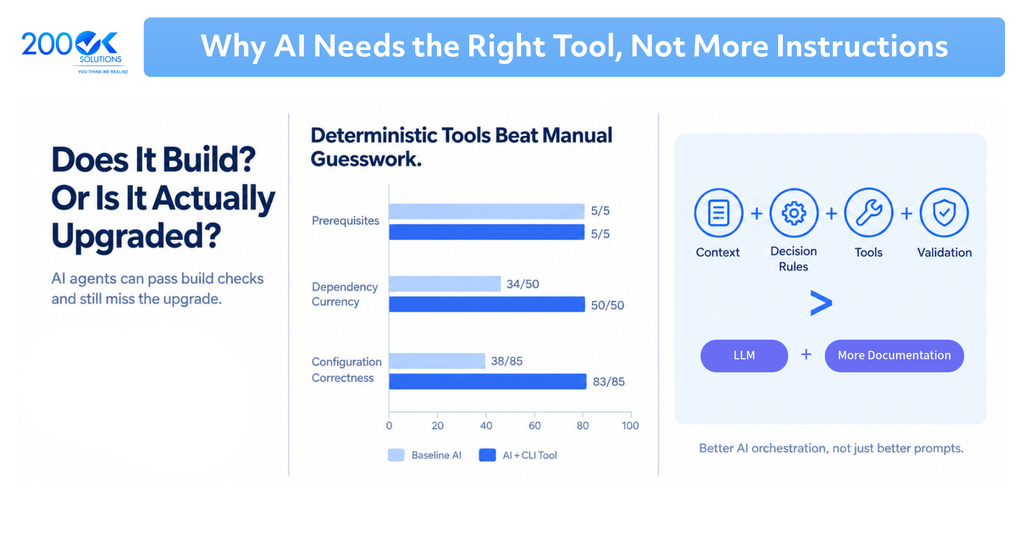
AI understands patterns, but enterprise systems depend on context.
An AI model trained on public repositories has seen thousands of examples of how SPFx code generally looks. It has not seen your tenant’s permission model, your organization’s internal APIs, or the reason a particular workaround was added eighteen months ago to fix a production incident. That context lives with your engineering team, not inside a language model.
Can AI Understand Your SPFx Dependencies?
Dependency management is one of the trickiest parts of any SPFx upgrade. A single project might involve package.json entries for React, TypeScript, Microsoft Graph packages, SPFx build tools, and various npm utilities, all of which need to stay compatible with each other and with the target SPFx version.
AI can help identify potential conflicts by reviewing version numbers and flagging known incompatibilities. That’s useful. But it cannot replace the step where engineers:
- Confirm compatibility against official Microsoft documentation
- Run the upgrade in a real test environment
- Review actual test results, not assumed outcomes
- Assess the production impact before rollout
Treat AI’s dependency analysis as a first pass, not a final verdict.
AI and SPFx Security: Why Human Review Matters
Security is the area where caution matters most. SPFx solutions often rely on Microsoft Graph permissions, API permission scopes, and Web Api Permission Requests configurations that control access to sensitive business data.
AI can suggest permission changes, but it doesn’t inherently understand least-privilege principles as they apply to your specific tenant, nor does it carry accountability for a misconfigured scope that exposes data it shouldn’t. Authentication and authorization logic in particular needs a level of scrutiny that goes beyond “does this code run.”
Every AI-generated security or permission change should be reviewed by an experienced engineer before it goes anywhere near production.
A Better Approach: AI-Assisted SPFx Upgrades
Rather than treating AI as fully autonomous or dismissing it altogether, a practical framework works better:
- Audit the Existing SPFx Solution : Understand the architecture, dependencies, integrations, and business workflows before touching anything.
- Define the Upgrade Path : Identify the current SPFx version and the target version clearly.
- Use AI for Analysis and Suggestions : Let AI review code and propose changes as a starting point.
- Validate Against Official Documentation : Cross-check every AI recommendation against Microsoft’s current guidance.
- Upgrade in a Controlled Environment : Never apply upgrades directly to production.
- Test Everything : Functional, integration, security, and performance testing, in that order of priority.
- Conduct Human Code Review : Experienced engineers sign off on critical changes.
- Deploy Gradually : Roll out with monitoring, not a single big-bang release.
This process lets AI do what it’s good at speed, while keeping humans responsible for judgment calls that carry real business risk.
The Future of AI in SharePoint SPFx Development
AI’s role in SPFx development, code reviews, dependency analysis, automated testing, migration planning, documentation, and troubleshooting will keep expanding. That trend isn’t slowing down.
But the future isn’t AI replacing SharePoint developers. It’s AI handling the repetitive groundwork so experienced developers can spend more time on the decisions that actually require judgment, architecture choices, security trade-offs, and understanding how a change ripples through a live enterprise system.
Conclusion
Can we trust AI to upgrade SPFx solutions? Yes, but with the right boundaries.
AI can analyze, suggest, generate, refactor, and accelerate. What it cannot do is validate, test, review, approve, or take responsibility for a production outcome. Those remain the job of engineers who understand the full context of the system they’re upgrading.
The organizations that succeed with AI-powered SPFx development will not be the ones that blindly trust AI. They will be the ones that combine AI speed with experienced engineering judgment.
FAQ
Q1 : What is SPFx?
A. SPFx, short for SharePoint Framework, is Microsoft’s development model for building custom web parts, extensions, and applications for SharePoint Online, using tools like React and TypeScript.
Q2 : Can AI help with SPFx development?
A. Yes. AI can generate SPFx web parts, React components, and TypeScript code, explain SharePoint APIs, and speed up common development tasks, particularly for new, greenfield projects.
Q3 : Can AI upgrade SharePoint Framework applications?
A. AI can assist with SPFx upgrades by analyzing code, flagging deprecated dependencies, and suggesting migration steps. However, it cannot fully understand tenant-specific configurations, business logic, or security requirements, so human validation is essential.
Q4 : What are the risks of upgrading SPFx applications with AI?
A. Risks include incorrect dependency recommendations, broken integrations, permission misconfigurations, hallucinated APIs, and workflow disruptions, all of which can look fine in code but cause real problems in production.
Q5 : How should companies use AI for SPFx modernization?
A. Companies should use AI as an assistant for analysis, suggestions, and code generation, while relying on experienced engineers to validate, test, and approve every change before it reaches production.
Final CTA
If your organization is planning an SPFx upgrade or a broader SharePoint modernization effort, 200OK Solutions can help you combine AI-driven efficiency with the engineering oversight enterprise systems require. Get in touch to discuss your current SPFx environment and upgrade path.
You may also like: SharePoint + Copilot: Building AI Native Workplaces That Scale

What’s the Real ROI of SharePoint Syntex for Your Organisation?
Get a practical ROI calculator + implementation checklist used by enterprises to modernize SharePoint with AI, without trial-and-error.