


Illustration of a person using a computer with connected data visualizations and technological icons. The text reads 'Sanitize RSS Feed Using SharePoint Power Automate' along with the website URL 'www.200oksolutions.com'. The design features a dark blue background with purple and blue accents

Sanitize RSS Feed Using SharePoint Power Automate

Share this post on:

RSS feeds are a popular way to distribute news and updates, but sometimes they include special characters that can cause issues when processed or displayed. Fortunately, Power Automate provides a powerful way to handle and clean up these feeds. In this blog post, we’ll go through the process of removing special characters from a news RSS feed using Power Automate.

Prerequisites:

  • Microsoft account with access to Power Automate.
  • Basic understanding of RSS feeds and Power Automate flows.

Steps to Create flow:

  1. Go to [Power Automate] (https://flow.microsoft.com) and sign in with your Microsoft account.
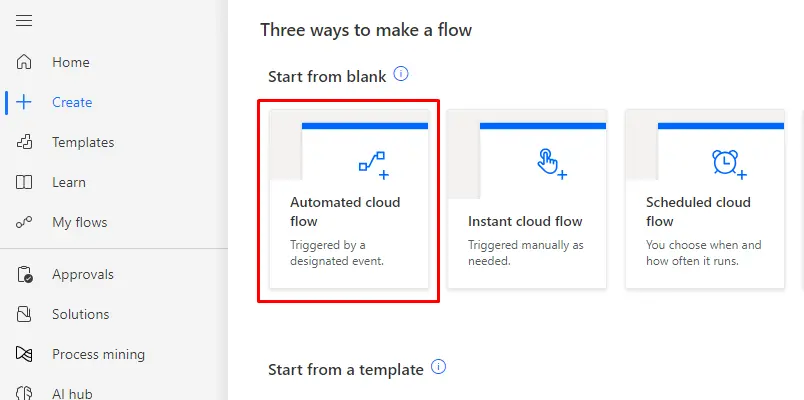
Screenshot of the "Automated cloud flow" option in a flow creation menu. It is described as being triggered by a designated event.

2. Click on “Create” in the left-hand menu & Choose “Automated flow” to start with a flow that triggers automatically.
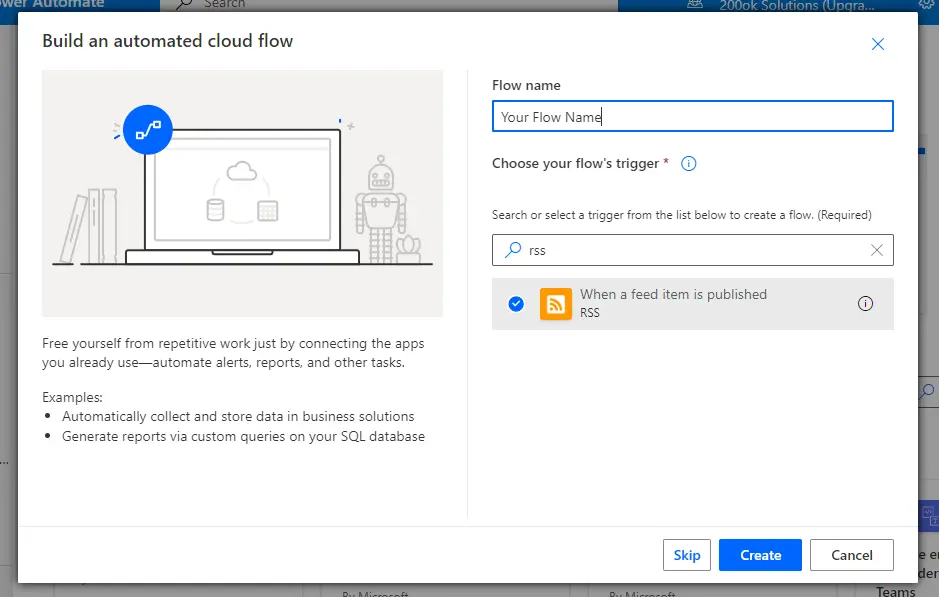
Screenshot of the Power Automate flow builder with the "When a feed item is published" trigger selected.

3. Select a trigger that fits your needs. For RSS feeds, you might use “When a feed item is published” or a similar RSS-related trigger. Configure the trigger with the URL of your RSS feed.
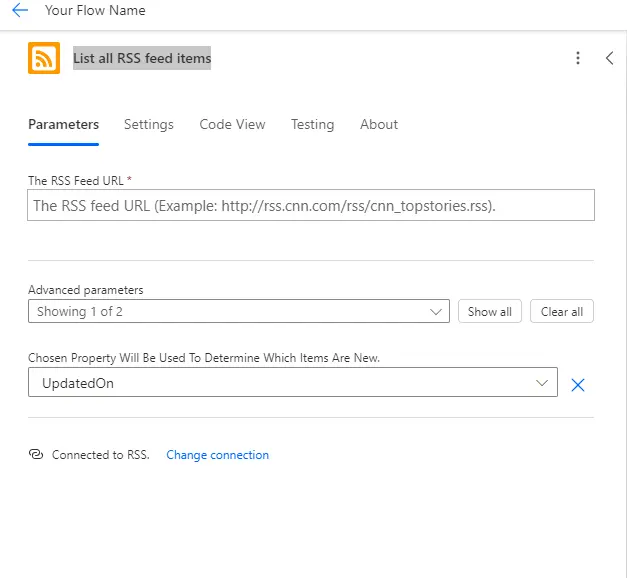
Power Automate flow builder with the "When a feed item is published" trigger selected. The user is configuring the RSS feed URL and advanced parameters for the trigger.

4. Click on New step.  Search for “RSS” and select “List all RSS feed items” or similar action depending on your trigger. Map the fields from the RSS feed to get the content you need. This often includes fields like the title, description, and link of the news item.

5. Click on New step then Search for and select “Compose” or “Data Operations – Compose.”
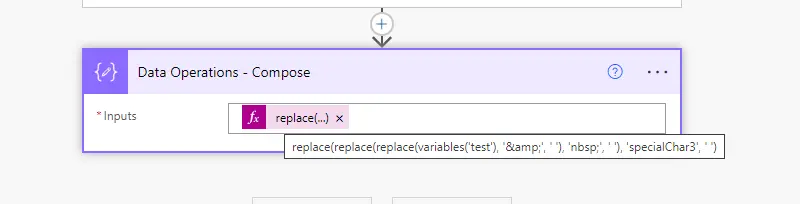
Power Automate Compose action with nested replace functions to clean up the variable 'test' by removing '&', 'nbsp;', and 'specialChar3'.


6. If you want to store the cleaned content in a SharePoint list or database, add the appropriate action (e.g., “Create item” for SharePoint). For now we are storing output in compose it self.
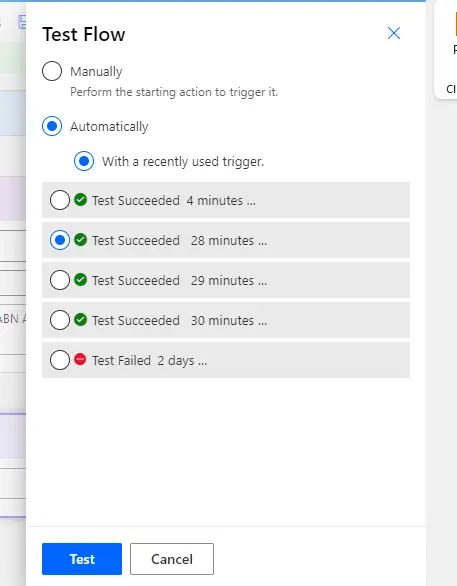
Power Automate flow test options dialog. Choose between manual or automatic testing, and view recent test results.


7. Save your flow and test it by triggering the RSS feed.

8. Verify that the special characters are correctly removed and that the cleaned content is stored or used as intended.
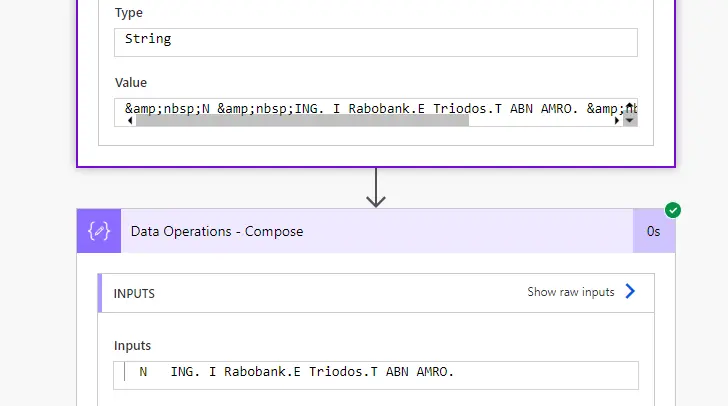
Power Automate Compose action with input text containing special characters like '&' and 'nbsp;'. The Compose action is used to remove these special characters from the input text.


9. Check the output in your storage system or destination to ensure the content appears as expected. As shown output of our input.

Conclusion:

By following these steps, you can efficiently remove special characters from news RSS feeds using Power Automate. This process ensures that your content remains clean and suitable for further use or display.

Related Post:

If you’re interested in learning more about managing content and user access within your organization, check out our guide on How to Enable and Manage Guest Users for Site Sharing in SharePoint. This post will help you streamline collaboration while ensuring security in SharePoint.

Piyush Solanki

PHP Tech Lead & Backend Architect

10+ years experience
UK market specialist
Global brands & SMEs
Full-stack expertise

Core Technologies

PHP 95%
MySQL 90%
WordPress 92%
AWS 88%
  • Backend: PHP, MySQL, CodeIgniter, Laravel
  • CMS: WordPress customization & plugin development
  • APIs: RESTful design, microservices architecture
  • Frontend: React, TypeScript, modern admin panels
  • Cloud: AWS S3, Linux deployments
  • Integrations: Stripe, SMS/OTP gateways
  • Finance: Secure payment systems & compliance
  • Hospitality: Booking & reservation systems
  • Retail: E-commerce platforms & inventory
  • Consulting: Custom business solutions
  • Food Services: Delivery & ordering systems
  • Modernizing legacy systems for scalability
  • Building secure, high-performance products
  • Mobile-first API development
  • Agile collaboration with cross-functional teams
  • Focus on operational efficiency & innovation

Piyush is a seasoned PHP Tech Lead with 10+ years of experience architecting and delivering scalable web and mobile backend solutions for global brands and fast-growing SMEs.

He specializes in PHP, MySQL, CodeIgniter, WordPress, and custom API development, helping businesses modernize legacy systems and launch secure, high-performance digital products.

He collaborates closely with mobile teams building Android & iOS apps, developing RESTful APIs, cloud integrations, and secure payment systems. With extensive experience in the UK market and across multiple sectors, Piyush is passionate about helping SMEs scale technology teams and accelerate innovation through backend excellence.