


If you’ve been building Laravel applications for a while, you’ve probably hit that point where the codebase starts feeling like a tangled mess – controllers importing models from everywhere, business logic scattered across files, and a folder structure that required a mental map to navigate. The advice is usually: keep a simple monolith, or go microservices. But there’s a third path that most teams overlook.
The Laravel modular monolith sits right in the middle – one deployed application, internally structured into self-contained modules with enforced boundaries. You get clean architecture without the operational overhead of microservices.
This guide walks through building a real Laravel 12 application with this architecture – folder structure, service providers, cross-module communication via Events, and FormRequest validation. Every pattern here comes from actually building it.
1. Monolith vs Modular Monolith vs Microservices
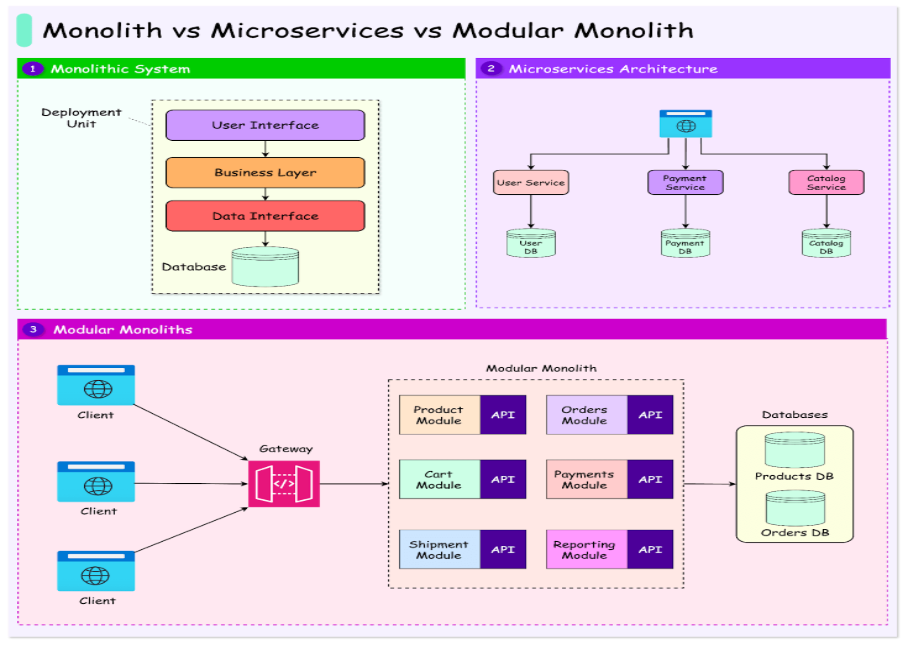
Before writing a single line of code, it helps to understand where a modular monolith fits. A standard Laravel app is clean at first – but as it grows, there are no enforced boundaries, and any controller can freely import any model. This is the “big ball of mud” problem.
Microservices solve the coupling problem but introduce network latency, distributed tracing, complex deployments, and multiple codebases. For a team of two or three developers, that’s bringing a crane to move a couch.
A modular monolith gives you the organisational benefits of microservices – enforced boundaries, independent domains – while staying as a single deployable application.
| Monolith | Modular Monolith | Microservices | |
| Deployment | Single | Single | Multiple |
| Codebase | One | One | Multiple |
| Boundaries | None | Enforced | Enforced |
| Complexity | Low | Medium | High |
| Team fit | Solo/Small | Small/Medium | Medium/Large |
| Best for | MVPs | Growing products | Large-scale systems |
When Should You Use It?
A modular monolith is a strong fit when your app has clear domain boundaries (Users, Orders, Payments), your team is small-to-medium, and you want clean architecture without microservices overhead. It is not the right choice for a simple side project or a basic CRUD app with two models — a standard Laravel structure is perfectly fine in those cases.
2. Setting Up the Project Structure
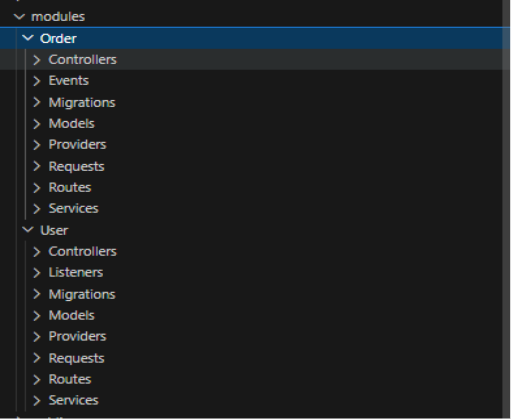
A standard Laravel app organises files by type (all controllers together, all models together). A modular monolith flips this entirely – you organise by domain. Every module owns its own controllers, models, services, migrations, and routes.
Create the Folder Structure
Run this once per module. The modules/ directory lives at the project root alongside app/:
#User module creation
mkdir modules\User\Controllers modules\User\Models modules\User\Services modules\User\Migrations modules\User\Requests modules\User\Providers

mkdir modules\User\Routes
type nul > modules\User\Routes\api.php

type nul > modules\User\Providers\UserServiceProvider.php
#Order module creation

mkdir modules\Order\Controllers modules\Order\Models modules\Order\Services modules\Order\Migrations modules\Order\Requests modules\Order\Providers

mkdir modules\Order\Routes

type nul > modules\Order\Routes\api.php

type nul > modules\Order\Providers\UserServiceProvider.php
Register the Namespace in composer.json
Open composer.json and add the Modules\\ namespace to the PSR-4 autoload map, then run composer dump-autoload:
"autoload": {
    "psr-4": {
        "App\\": "app/",
        "Modules\\": "modules/"   // Add this line
    }
}
Create the Module Service Provider
Every module self-registers its routes and migrations through its own ServiceProvider. Create modules/User/Providers/UserServiceProvider.php:
public function boot(): void
{
    $this->loadRoutesFrom(__DIR__ . '/../Routes/api.php');
    $this->loadMigrationsFrom(__DIR__ . '/../Migrations');
}
Then register it in bootstrap/providers.php (Laravel 12):
return [
    App\Providers\AppServiceProvider::class,
    Modules\User\Providers\UserServiceProvider::class,
    Modules\Order\Providers\OrderServiceProvider::class,
];
3. Building a Module: The Service Layer Pattern
Every module follows the same three-layer pattern: Controller → Service → Model. Controllers accept requests and delegate. Services hold all business logic. Models are internal implementation details that never leak outside the module.
The service layer is the most important piece. Here is the UserService – notice how each public method maps to a clear business operation:
// modules/User/Services/UserService.php
class UserService
{
    public function getAllUsers()
    {
        return User::all();
    }
    public function createUser(array $data): User

    {
        return User::create([
            'name'     => $data['name'],
            'email'    => $data['email'],
            'password' => bcrypt($data['password']),
        ]);
    }
Key rule: Business logic lives in the Service. The Controller’s only job is: receive a validated request, call the service, return the response. Nothing more.
4. Cross-Module Communication: The Right Way
This is where most modular monolith implementations break down. When two modules need to communicate, the temptation is to reach directly into another module’s model. This destroys the architecture entirely.
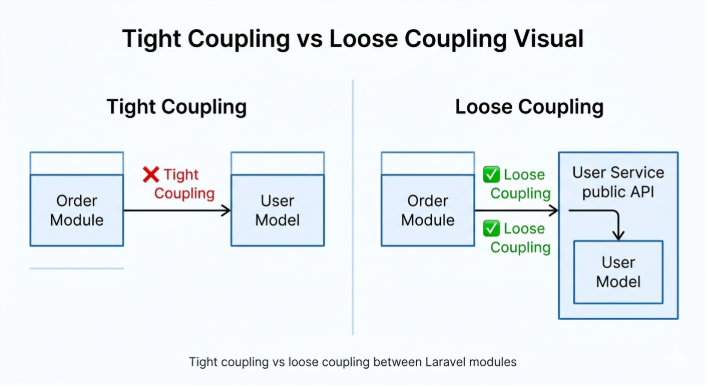
The Wrong Way -Tight Coupling
Adding an Eloquent relationship like Order → belongsTo(\Modules\User\Models\User::class) seems harmless, but the Order module has now imported the User module’s internal model. The two modules are no longer independent:
• If you refactor the User model, the Order module breaks too
• You cannot test the Order module in isolation
• Extracting Orders into its own service later means untangling a hard dependency
• Developers have no clear signal about where module boundaries are
Pattern 1 – Service Injection
When the Order module needs user data, inject UserService into OrderService via the constructor. Laravel’s container resolves this automatically – no manual binding required. The Order module consumes the public interface (the service) rather than the internal implementation (the model):
// modules/Order/Services/OrderService.php
class OrderService
{
    public function __construct(
        protected UserService $userService  // Injected automatically
    ) {}
    public function getOrderWithUser(int $orderId): array
    {
        $order = Order::find($orderId);
        $user  = $this->userService->findUser($order->user_id); // Via service
        return ['order' => $order, 'user' => $user];
    }
}
Pattern 2 – Events and Listeners
Service injection handles “I need data from another module.” But what about “something happened, and other modules should react”? That’s where Laravel Events come in.
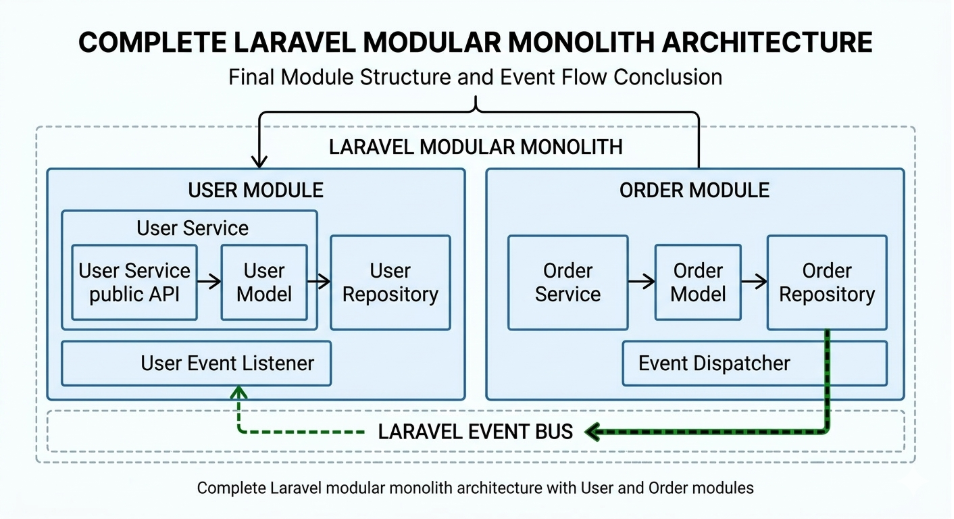
When an order is placed, the Order module shouldn’t know or care that a confirmation email gets sent -it just fires an event and moves on. The User module’s listener reacts independently:
// Step 1 — Fire the event from OrderService (Order module)
public function createOrder(array $data): Order
{
    $order = Order::create([...]);
    event(new OrderCreated($order));   // Fire and forget
    return $order;
}

// Step 2 — Register the listener in AppServiceProvider
Event::listen(OrderCreated::class, SendOrderConfirmation::class);

// Step 3 — User module reacts independently
// modules/User/Listeners/SendOrderConfirmation.php
public function handle(OrderCreated $event): void

{
    $user = User::find($event->order->user_id);
    // Send confirmation email / log / update loyalty points...
}
The payoff: The Order module never imports anything from the User module. Tomorrow, if you want to also send an SMS or update a loyalty counter – add another listener. The Order module code does not change at all.
5. FormRequest Validation Per Module
Without validation, store() methods accept raw $request->all() with zero checks. FormRequests move validation into its own dedicated class per module, and a shared BaseRequest guarantees a consistent error format across the entire application:
// app/Http/Requests/BaseRequest.php  — shared by ALL modules
class BaseRequest extends FormRequest
{
    protected function failedValidation(Validator $validator): void
    {
        $firstError = collect($validator->errors()->all())->first();
        throw new HttpResponseException(
            response()->json([
                'success'    => false,
                'statusCode' => 422,
                'message'    => $firstError,
                'data'       => []
            ], 422)
        );
    }
}
Each module then extends BaseRequest and defines only its own rules. Every failed validation response site-wide now returns the same JSON shape automatically – no duplication, no inconsistency.
Consistent error response: { “success”: false, “statusCode”: 422, “message”: “Email is required”, “data”: [] }
6. Artisan Gotchas You’ll Hit in Practice
Building a modular monolith without a dedicated package comes with a few rough edges. Know these upfront:
• make:migration works cleanly with –path=modules/User/Migrations
• make:model, make:controller, make:request, make:event always generate inside app/ – create these files manually
• Always check the namespace at the top of any artisan-generated file – it sometimes defaults to App\\ regardless of path
• Delete app/Models/User.php once you create your module’s User model – the duplicate causes confusing auth guard errors
• If php artisan migrate misses your module migrations, double-check loadMigrationsFrom() path in the ServiceProvider’s boot() method
• Consider nwidart/laravel-modules if your team grows – it adds module-aware artisan commands and scaffolding
Conclusion
A Laravel modular monolith sits in the pragmatic middle ground – one deployed application with the organisational discipline of independent services. Here is everything this guide covered:
1. A modular folder structure where each domain owns its Controllers, Models, Services, Requests, Routes, and Providers
2. Module Service Providers that self-register routes and migrations – zero central configuration required
3. A service layer that keeps controllers thin and business logic testable in isolation
4. Loose cross-module coupling via Service Injection (for data) and Events (for side-effects)
5. A shared BaseRequest pattern for consistent FormRequest validation across all modules
When to use it: Your app has clear domain boundaries, your team is small-to-medium, and you want clean architecture without microservices overhead.
When not to use it: A simple CRUD app, a blog, a small side project – standard Laravel is perfectly fine. Architecture should solve real problems,
You may also like: Laravel Performance Optimization: 10 Proven Tips to Make Your Application 10x Faster

