Add a SharePoint page as a tab in Teams

Add a SharePoint page as a tab in Teams

Share this post on:

Bring team resources to one central place so that team members can focus, communicate, and collaborate to get work done. Add the SharePoint tab in Teams to quickly paste any published page, or news post from a SharePoint site.

In Microsoft Teams, you can add published SharePoint pages as individual tabs in a Teams channel. Team members can view pages in the Teams tabs.

  • Pages – SharePoint pages let you share information, news or ideas using images, videos, and links.

Add a page from your team site as a tab in Teams

Notes:

  • Each page will need to be added as a tab one at a time. Repeat this process to add more tabs to your Teams channel.
  • You must be the Site owner of the SharePoint site to add site content as a tab in Teams.
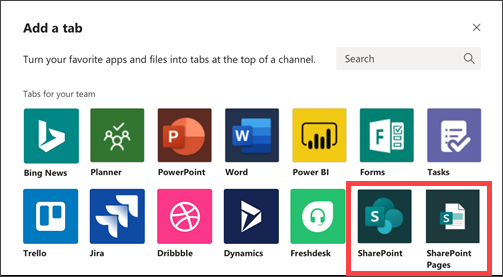
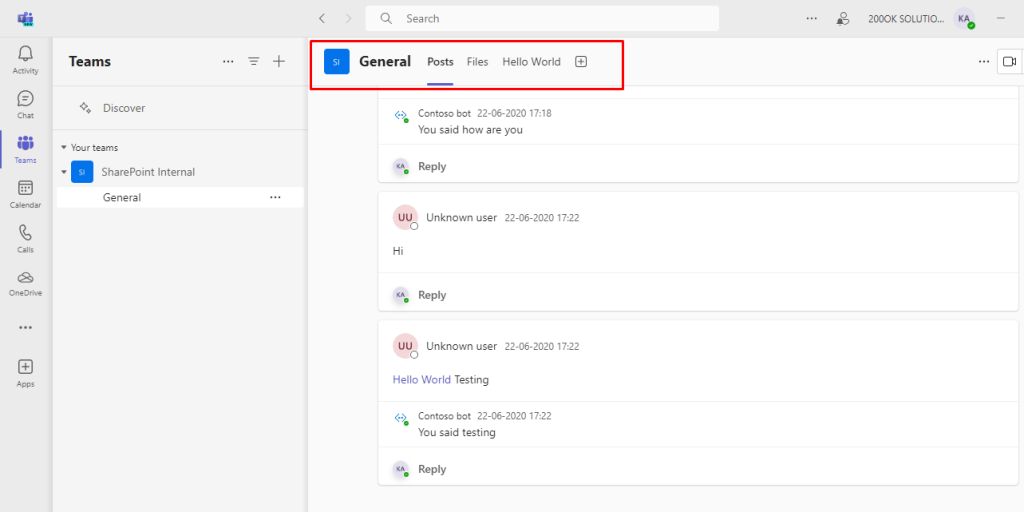
  • In Teams, select the channel page. To the right of the channel name, select the + on the tab bar.
  • Select the SharePoint tab.

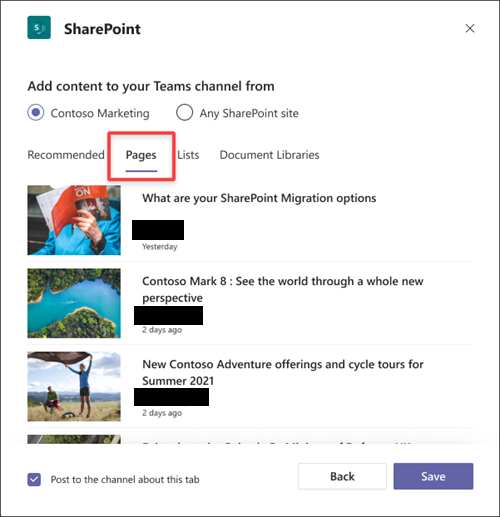
  • Select Pages to see a list of existing SharePoint pages and news posts available from your team site. Select the SharePoint content to add as a tab in the Teams channel.
  • Select Post to the channel about this tab checkbox to automatically generate and post an announcement in the Teams channel letting your colleagues know that you’ve added this tab.
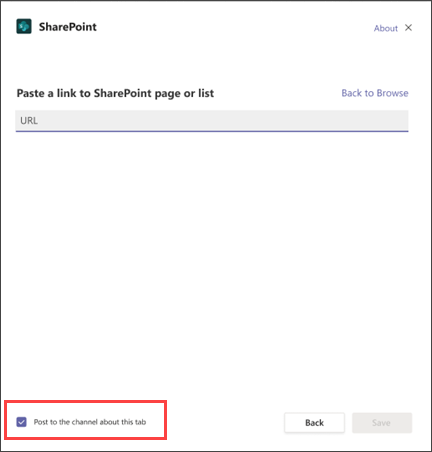
  • Select Save.

Important Note:

  • SharePoint checks the given URL to make sure it’s right and only lets users go to the specific page if they have permission.
  • The permissions for the original SharePoint page stay the same when it’s used in Microsoft Teams.
  • If someone in Teams doesn’t have permission for a certain page, they’ll see a page asking if they can get access.
  • This easy process makes it simple for people to work together while still keeping control over who can see what.
  • Basically, when SharePoint works with Teams, it keeps the permissions for pages and makes it easy for users to ask for access to restricted content.

What’s the Real ROI of SharePoint Syntex for Your Organisation?

Get a practical ROI calculator + implementation checklist used by enterprises to modernize SharePoint with AI, without trial-and-error.

Piyush Solanki

PHP Tech Lead & Backend Architect

10+ years experience
UK market specialist
Global brands & SMEs
Full-stack expertise

Core Technologies

PHP 95%
MySQL 90%
WordPress 92%
AWS 88%
  • Backend: PHP, MySQL, CodeIgniter, Laravel
  • CMS: WordPress customization & plugin development
  • APIs: RESTful design, microservices architecture
  • Frontend: React, TypeScript, modern admin panels
  • Cloud: AWS S3, Linux deployments
  • Integrations: Stripe, SMS/OTP gateways
  • Finance: Secure payment systems & compliance
  • Hospitality: Booking & reservation systems
  • Retail: E-commerce platforms & inventory
  • Consulting: Custom business solutions
  • Food Services: Delivery & ordering systems
  • Modernizing legacy systems for scalability
  • Building secure, high-performance products
  • Mobile-first API development
  • Agile collaboration with cross-functional teams
  • Focus on operational efficiency & innovation

Piyush is a seasoned PHP Tech Lead with 10+ years of experience architecting and delivering scalable web and mobile backend solutions for global brands and fast-growing SMEs.

He specializes in PHP, MySQL, CodeIgniter, WordPress, and custom API development, helping businesses modernize legacy systems and launch secure, high-performance digital products.

He collaborates closely with mobile teams building Android & iOS apps, developing RESTful APIs, cloud integrations, and secure payment systems. With extensive experience in the UK market and across multiple sectors, Piyush is passionate about helping SMEs scale technology teams and accelerate innovation through backend excellence.

    Your Team Wastes 16+ Hours
    Weekly on Manual Documents

    Calculate exactly how much time & money you're losing

    $47,000+ Average annual waste per organization
    Enter a valid phone number (10–12 digits, optional + at start)
    ✓ 100% Free ✓ Instant Results ✓ No Obligation

    We respect your privacy. Your information will only be used to send you the ROI calculator and helpful resources. Privacy Policy